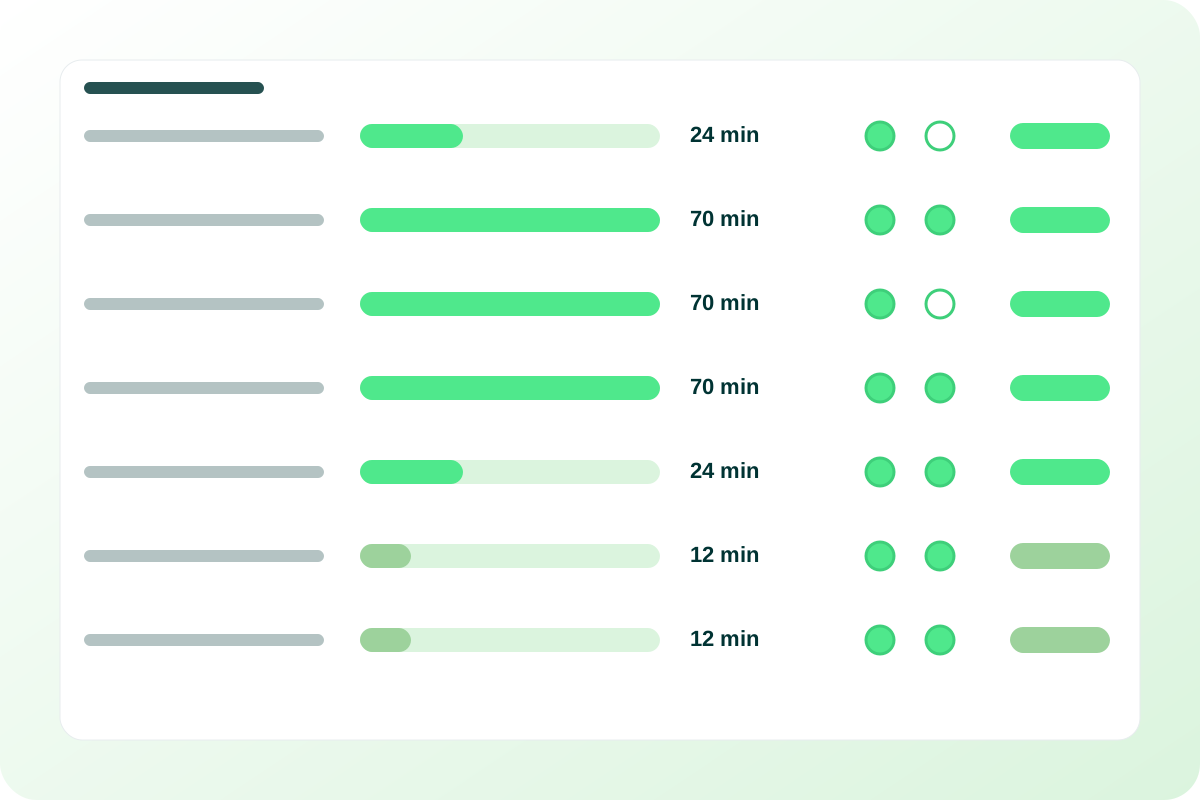
Chronic Care Management

Between-visit care, documented as it happens.

ccm.eklotho.com is the program-management workspace for Chronic Care Management (CCM): a candidates worklist built from chart diagnoses, enrollment with consent and a care manager, coded care plans with tasks and goals, an append-only time log with 20/40/60-minute tiers, and a monthly review with two attestations — on the same patient record the EMR and the RPM program use.

Overview

Candidates, consent, coded care plans, care-time tiers and an attested monthly review for a Chronic Care Management program.

Chronic Care Management (CCM) is the work between visits for patients living with two or more chronic conditions — the calls, medication checks and coordination that keep a plan moving. The care is the easy part to describe; the record is what wears programs down. Who is eligible? Who consented, when and how? What does the care plan actually say? How many minutes were spent this month, by whom? Was the plan reviewed with the patient? ccm.eklotho.com is built so those answers are produced by doing the work, not reconstructed afterwards. It is the workspace for the program director, the care managers and the clinic staff who run CCM, and it shares one patient record with the eKlotho EMR and the RPM program.

The screen map is deliberate. A program dashboard shows enrollment by clinic, care-time tier distribution and workload per care manager. A candidates worklist lists patients from chart diagnoses who are not yet enrolled. The enrolled-patients list opens into a per-patient overview with conditions, the care plan, the time log and the monthly review. A care-plan workspace holds tasks and goals. A monthly board shows minutes, tier and review status per patient. Reminders, messaging, a personal time log and compliance exports complete it. Directors and care managers see the program; clinic staff see their own panel. Access comes from the existing organization graph, so no new role machinery is needed.

Two rules from the original eKlotho program carry over unchanged. Care time is tiered in twenty-minute buckets — the first 20 minutes, the next 20, the next 20 — and the server computes the tier from an append-only log, never from a typed number. And logging time from an alert resolves that alert. A third rule is the monthly review: a summary and two attestations — care plan reviewed with the patient, patient confirmed understanding — recorded as yes, no or unanswered, then signed and locked. The app does not count money. Minutes and tiers are compliance facts; billing eligibility is determined by the practice and its payers.

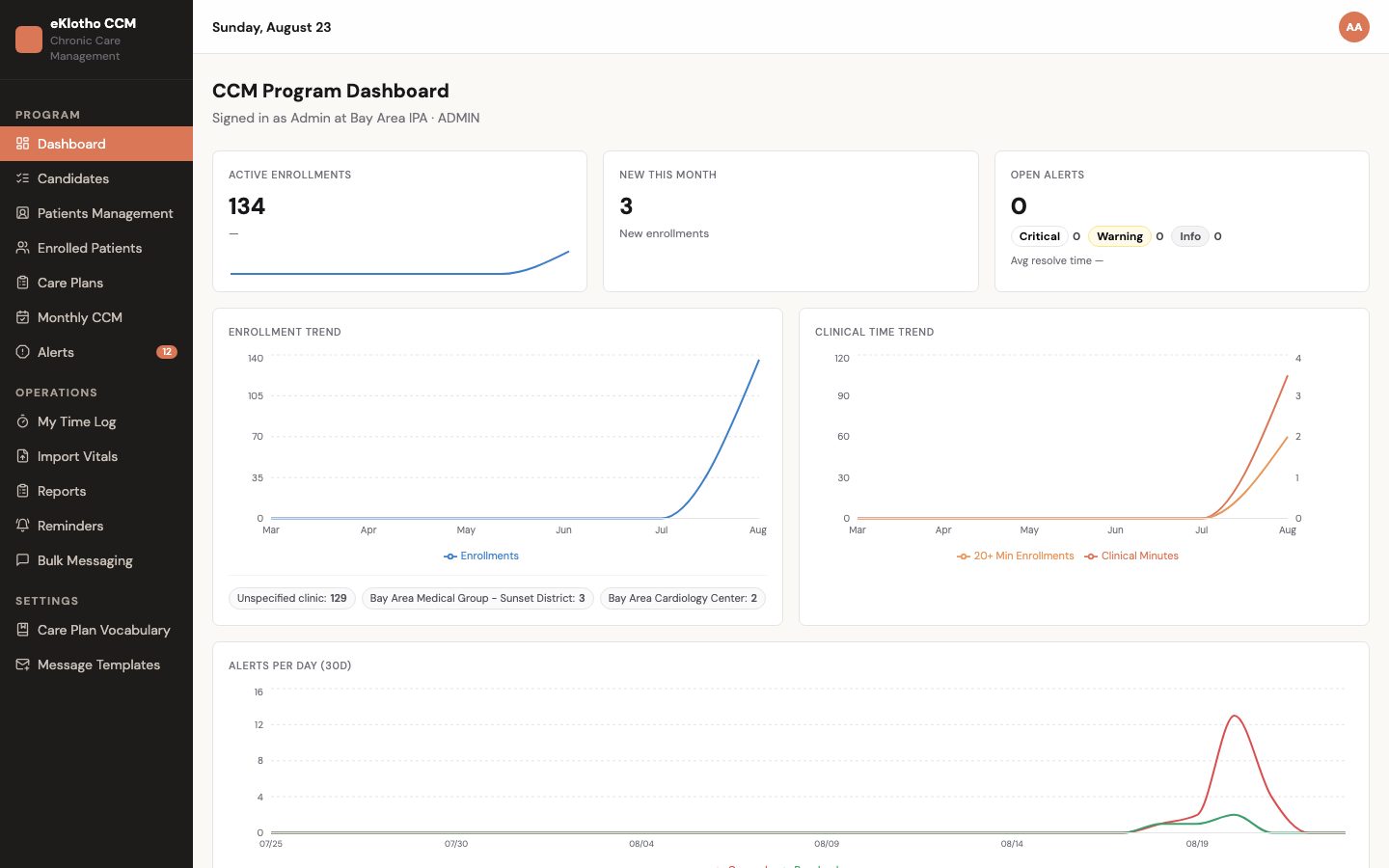
Chronic Care Management — main screen
Chronic Care Management — main screen (demo environment, synthetic data).
Who uses it

Built around the people doing the work

CCM program director

Needs · To see enrollment growing, minutes landing in the right tiers, and which patients are short or unreviewed before the month closes.

Gets · The program dashboard with enrollment by clinic and month-over-month change, 20/40/60 tier distribution and a workload row per care manager; the monthly board with minutes, tier and review status per patient; the compliance export.

Care manager

Needs · A worklist of who to call, a care plan that says what to cover, and minutes that count themselves.

Gets · The candidates worklist with enroll-in-place, coded care plans with tasks and goals, a timer and time-log drawer on the patient overview, reminders with a cross-patient due list, and messaging with templates.

Care coordinator

Needs · To keep follow-ups, referrals and patient to-dos from slipping between calls.

Gets · Care-plan tasks with owner, priority and due date; per-patient reminders; a message log per patient; and open tasks that show up in the patient's own app and web account.

Clinician at the clinic

Needs · To know which patients are enrolled and what the care team is doing, from the chart.

Gets · The CCM/RPM summary card on the eKlotho EMR chart with enrollment status and month-to-date minutes, plus panel-scoped views of the clinic's own candidates and enrollments. Read-only by design; the workflow stays in ccm.eklotho.com.

Patient

Needs · To know what they agreed to and what they are supposed to do next.

Gets · Consent recorded on the enrollment, and their open care-plan tasks alongside medications and upcoming visits in the eKlotho app and the eklotho.com account, served by the Mobile API.

Billing and compliance lead

Needs · Minutes, tiers and a signed monthly review per patient that will hold up to an audit.

Gets · Append-only time logs with server-computed duration, a monthly review that becomes read-only once signed, and a monthly CSV with minutes and tier per patient per program.

Today vs. with eKlotho

What actually changes

AreaTodayWith Chronic Care Management
Finding eligible patientsA report someone runs when they remember, or a list built from memory of who has 'a lot going on'.A live worklist from chart diagnoses: two or more chronic-condition groups, not already enrolled, in this clinic's panel, ordered by how many groups.
ConsentA note in the chart or a paper form in a folder; whether it was captured is a question, not a fact.Consent date and method live on the enrollment record. A new enrollment starts as pending consent and is moved to active as an explicit step, with one active enrollment per program per patient.
The care planA free-text document that reads differently depending on who wrote it, and goes stale when that person leaves.A coded plan from a template — diagnosis, risks, indicators, goals, action plan — drawn from a managed vocabulary, with tasks that carry an owner, priority and due date.
Logging minutesCall durations typed into a spreadsheet, sometimes a week later, with no record of what was changed.A timer or manual entry per contact; the server computes duration, caps each entry and derives the 20/40/60-minute tier. Corrections are invalidations with a reason.
The monthly reviewA sentence in a note, if there is time; nobody can say later whether the plan was reviewed with the patient.A review with a summary and two attestations — care plan reviewed with patient, patient confirmed understanding — signed from the board and locked after signing.
Month-end closeDays of adding up minutes, chasing missing reviews and hoping the spreadsheet matches the chart.The board already shows minutes, tier and review status for every patient; the export is a download, not a project.
Capabilities

What's included

10 modules, each describing what is built today.

Program dashboard

Program health for the director and workload for the manager, without revenue widgets.

Candidates worklist

Find who is eligible from chart data before anyone makes a call.

Enrollment

A real state machine with consent, assignment and one active enrollment per program — not a checkbox on the chart.

Care plans

Coded, structured plans that survive staff changes and show the patient what is next.

Patient overview

One patient, one page: conditions, plan, time and the month, for the care manager working the call.

Time tracking

Append-only care-time logs that compute the tier for you, on the patient and in the care manager's own log.

Monthly board and review

The month, patient by patient: minutes, tier, review status and the two attestations.

Alerts

The shared rules engine, seen from the CCM side, with the alert-to-time-log shortcut preserved.

Reminders and messaging

Keep follow-ups from slipping and reach patients without leaving the workspace.

Reports and the EMR chart

Carry the month to the billing team and the status to the clinician.

In depth

How it actually works

Eligibility without a registry

Finding candidates from the chart

The candidates worklist starts from data the practice already maintains: the diagnosis list on the chart. Diagnosis codes are mapped by prefix into chronic-condition groups — a family of related codes treated as one condition — and a patient surfaces as a candidate when two or more groups are present and no enrollment exists yet. Because eligibility is computed from the chart rather than kept in a separate registry, the worklist cannot drift out of date: a diagnosis added in the EMR changes the list the next time it loads.

Consent as a fact

Enrollment as a state machine

An enrollment is not a checkbox on the chart — it is a record with a life of its own. It begins as pending consent, and moving it to active is an explicit step taken once consent is captured, with the date and the method — verbal, written or portal — stored on the record itself. Pausing, resuming and disenrolling are further transitions, disenrollment carries a reason, and the history survives every one of them, including a change of care manager or clinic.

Time integrity

Minutes that audit cleanly

A time-log entry submitted by a care manager carries only a start and an end. The server computes the duration, refuses an entry that ends before it starts or runs past the per-entry cap, and resolves the enrollment and program itself rather than trusting the request. Nothing about the number is typed, so nothing about the number can be mistyped — and the month-to-date total a director sees is arithmetic over rows, not a figure somebody maintained.

Attest and lock

The monthly review

The month closes on a review: a summary of the care delivered plus two attestations — the care plan was reviewed with the patient, and the patient confirmed understanding. Each attestation is tri-state — yes, no or unanswered — so a draft nobody finished reads as unanswered, never as a silent no on a compliance record. When the patient is also on RPM, the review can pull in a computed vitals summary for the month, an autofill that reads the readings without changing them.

Coded, not free-text

Care plans from vocabulary

Every care plan is assembled from a managed vocabulary of four term types — risks, indicators, goals and action plans — rather than written from scratch. A template pre-selects a coherent set of terms for a condition, so starting a plan from one gives every care manager the same clinical scaffolding whoever is on shift, and the plan still reads the same after the person who wrote it has moved on. Tasks carry an owner, a priority and a due date; goals carry a status that is worked over time.

How it works

From first step to outcome

  1. Identify

    The candidates worklist lists eligible patients from chart data — two or more chronic-condition groups, not enrolled, in the clinic's panel.

  2. Enroll

    Consent date and method are recorded, a care manager and clinic assigned, and the enrollment moved from pending consent to active.

  3. Plan

    A care plan is started from a template — risks, indicators, goals, action plan, tasks — and its open tasks are shared with the patient's app and web account.

  4. Deliver and log

    Every call, review and coordination is logged with a timer or manually; the tier updates as minutes accrue.

  5. Review and attest

    The monthly board shows minutes, tier and review status; the two attestations are recorded and the review signed — read-only from that point on.

  6. Export

    The compliance CSV carries minutes and tiers to the billing team; the clinician sees the status on the EMR chart.

A closer look

Screens and flows

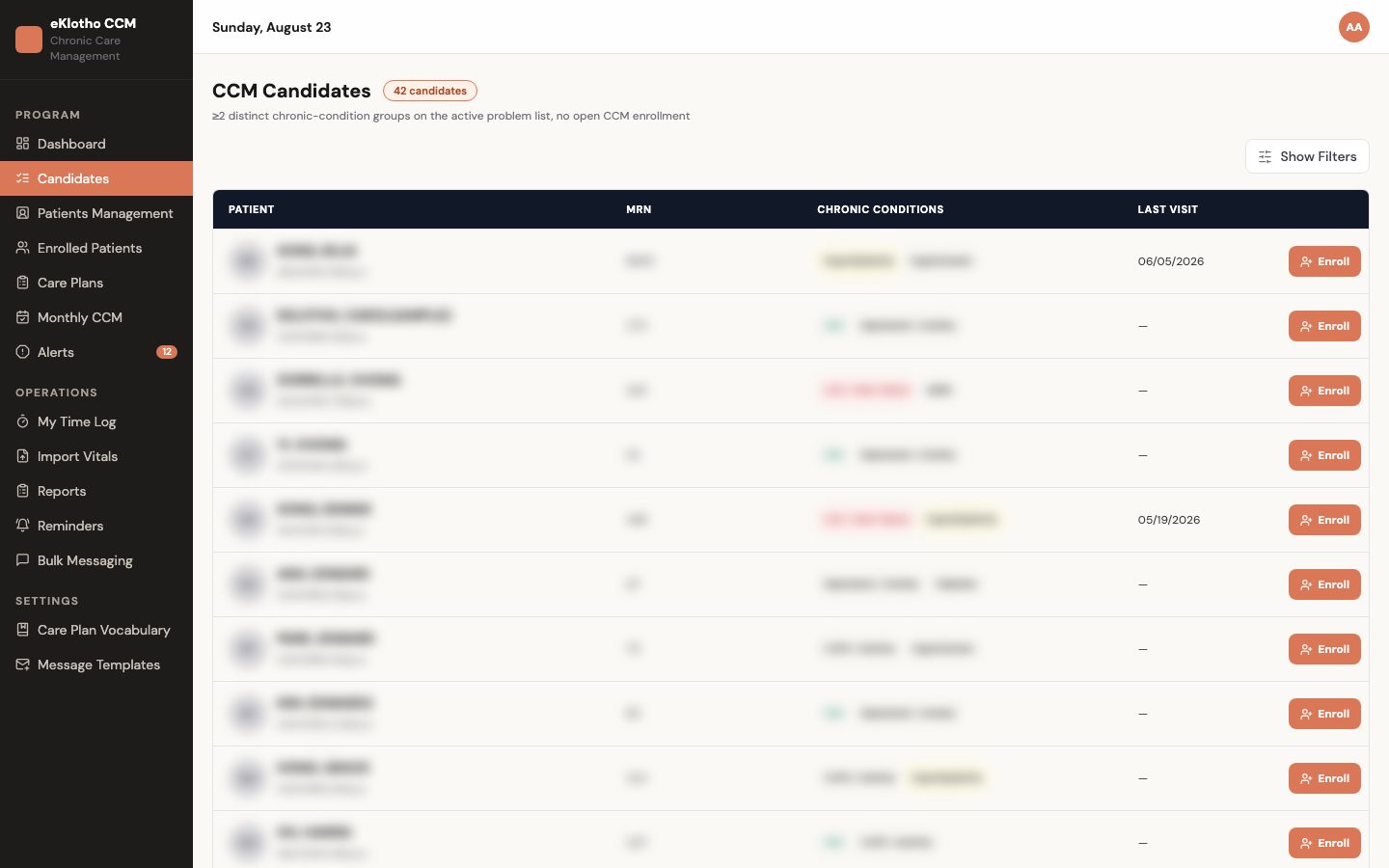
Candidates worklist
Candidates worklist — patients with two or more chronic-condition groups, not yet enrolled, with one-click enroll (demo environment, synthetic data).
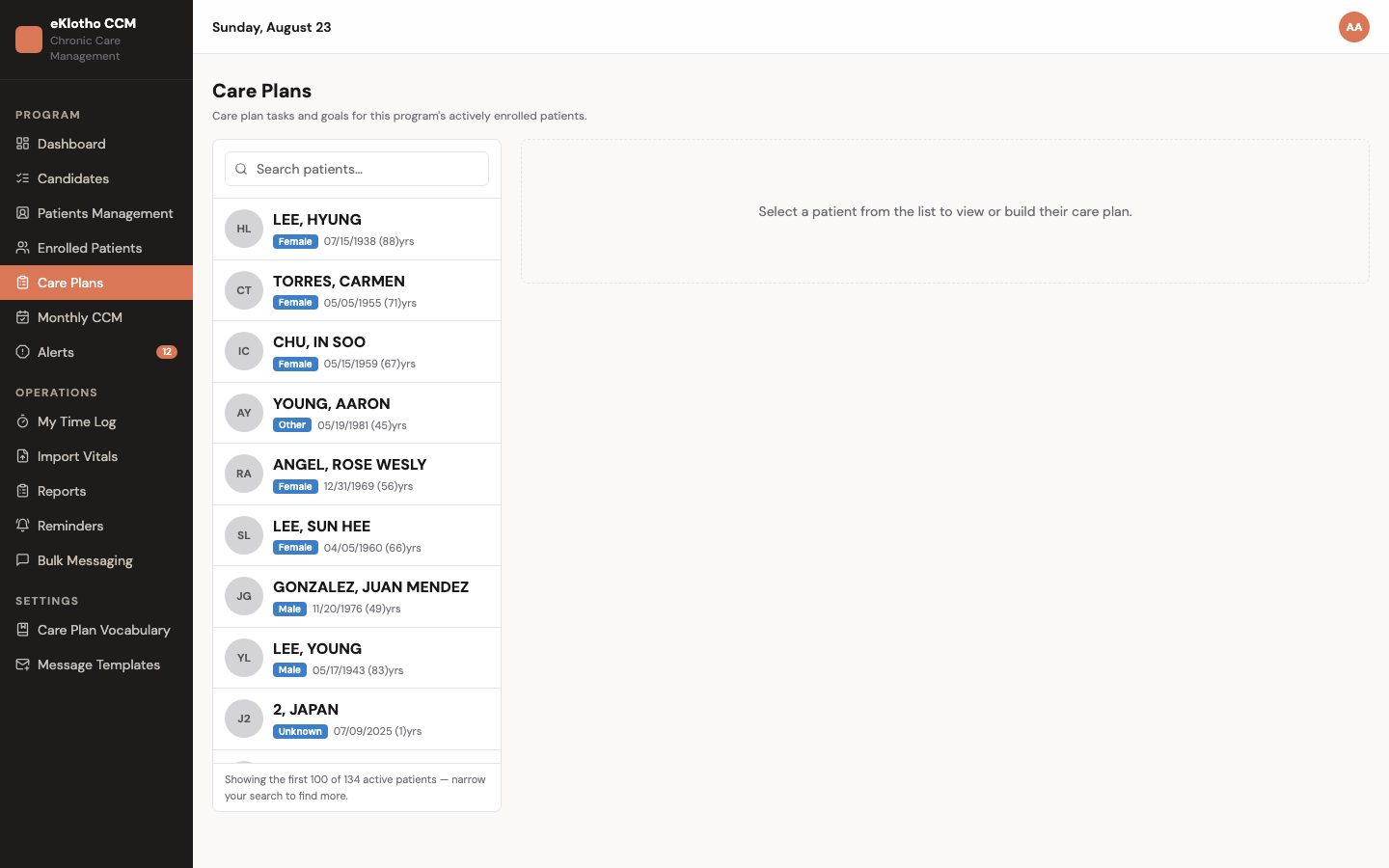
Care plans
Care plans — structured plans with tasks and goals per enrolled patient (demo environment, synthetic data).
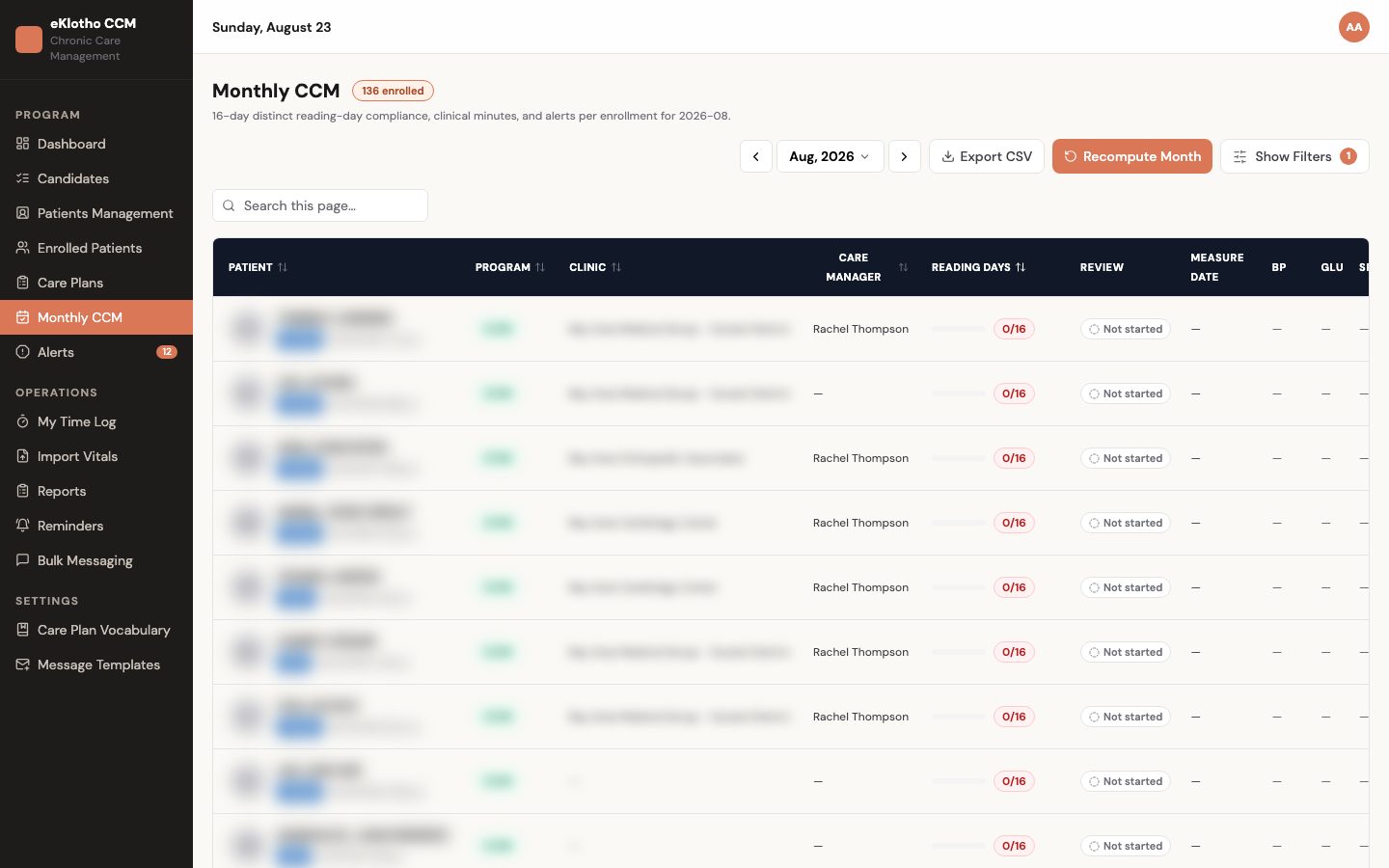
Monthly CCM board
Monthly CCM board — minutes, tier and review status per patient with attestations (demo environment, synthetic data).
How we make sure

The mechanics behind the claims

Every promise on this page maps to something the software actually enforces.

Minutes are never typed in
A time-log request carries only a start and end time. The server computes the duration, rejects an entry that ends before it starts or runs past the per-entry cap, and resolves the enrollment and program itself.
History is never rewritten
The only change allowed to a time log is marking it invalidated with a reason. Invalidated entries stay in the record and are excluded from minutes and tiers.
A signed review stays signed
Signing is a one-way transition. Once signed, update and delete requests are refused, and the board shows the review read-only with its signed date.
'Unanswered' is not 'no'
Each attestation is stored as yes, no or unanswered. A draft nobody finished is shown as unanswered — it is never rendered as an unchecked box on a compliance record.
One active enrollment per program
Enrollment is a state machine — pending consent, active, paused, disenrolled — and the service refuses to create or activate a second active enrollment for the same patient and program.
One clinic cannot read another's patients
The organization comes from the signed-in user's token, never from the request. Every candidate, enrollment, plan, log and reminder is resolved inside that organization, and a record outside it returns not-found.
Outcomes

What changes for your team

  • Eligible patients are found from the chart, not from memory, and enrollment enforces the rules
  • Consent date and method are on the record, so the enrollment holds up later
  • Care plans are coded and consistent across care managers, and the patient sees their own to-dos
  • Care time is tiered by the server from an append-only log, so month-end minutes are a download rather than a reconciliation
  • Monthly reviews carry two signed attestations and lock, giving the compliance lead a record rather than a sentence in a note
  • Clinicians see CCM context inline on the chart without owning the workflow, and CCM and RPM share one patient record
FAQ

Common questions

Terms on this page

CCM
Chronic Care Management — non-face-to-face care coordination for patients with two or more chronic conditions, delivered and documented between visits.
Chronic-condition group
A family of diagnosis codes treated as one condition for eligibility; a patient appears on the candidates worklist with two or more groups.
Enrollment
The record that puts a patient in a program with consent date and method, an assigned care manager, a clinic and a status; one active enrollment per program per patient.
Care-time tier
The twenty-minute bucket a patient's logged minutes fall into for the month — first 20, next 20, next 20 — shown as 20, 40 or 60-plus. Computed by the server from the time log.
Attestation
One of the two statements on the monthly review — care plan reviewed with patient, patient confirmed understanding — recorded as yes, no or unanswered.
Invalidation
The only correction allowed on a time log: the entry is marked invalid with a reason and excluded from totals; it is never edited or deleted.
Care-plan vocabulary
The program's managed list of risk, indicator, goal and action-plan terms that templates and plans draw from; shared terms are read-only and an organization's own terms are retired rather than deleted.
Panel scope
Limiting a list to the patients attributed to a clinic, so clinic staff see their own candidates and enrollments while the program sees all of them.
Monthly review
The month-end record for an enrolled patient: a summary, the two tri-state attestations and, when the patient is also on RPM, a computed vitals summary. Signed one-way and read-only afterwards.
Care-plan template
A pre-selected set of vocabulary terms — risks, indicators, goals, an action plan — used to start a plan for a condition, so plans read the same across care managers.
How is eligibility determined?

From the chart: two or more chronic-condition groups by diagnosis code, not already enrolled, scoped to the clinic's panel. The worklist is a starting list; enrollment records the eligible conditions and enforces one active enrollment per program.

How does care time become a tier?

The care manager logs time with a timer, a manual entry or from an alert. The server computes the duration and keeps a running month-to-date total; the tier is the twenty-minute bucket that total falls into — 20, 40 or 60-plus minutes.

Does it submit claims or count revenue?

No. It records minutes, tiers and signed reviews and exports them. Whether a month is billable is determined by the practice and its payers in their billing systems.

Can a patient be in CCM and RPM at the same time?

Yes. RPM and CCM are one program family on one patient record; each program has its own enrollment, the time log distinguishes them, and the CCM monthly review can include the RPM vitals summary.

What are the two attestations on the monthly review?

Care plan reviewed with patient, and patient confirmed understanding. Each is recorded as yes, no or unanswered, so an unfinished draft is never shown as a 'no'. Signing locks the review; corrections belong in the next month's review.

Do patients see their care plan?

Open care-plan tasks appear in the eKlotho app and on the patient's eklotho.com account alongside medications and upcoming visits, through the Mobile API. The apps are being connected to this platform.

Who manages the care-plan vocabulary and templates?

The program does, in settings. A shared set of risk, indicator, goal and action-plan terms is read-only; each organization adds its own terms and retires them rather than deleting, so existing plans keep their wording. Templates are selected in the workspace today; a template editor screen is on the roadmap.

What happens when a care manager leaves?

Enrollments are reassigned without losing history, and because care plans are coded from the shared vocabulary rather than written free-text, the next care manager reads the same plan the last one worked. Time logs, reviews and alert history all stay on the patient record.

Can minutes be corrected after the fact?

An entry is never edited or deleted. The correction is an invalidation with a reason: the row stays visible in the log, drops out of totals, and the tier recomputes from the surviving minutes. If the issue surfaces after the review is signed, the correction belongs in the next month's review — the signed record does not move.

See Chronic Care Management on your own workflows

We walk through it with your data and your team — not a canned demo.

Program and billing eligibility are determined by each practice and its payers. Results and alerts do not constitute a medical diagnosis. Third-party names are trademarks of their respective owners and do not imply endorsement.