SoCal Solution

Mobile phlebotomy dispatch, rebuilt around one funnel.

An intake console, a dispatch board, an offline-capable field app, a facility request portal and operations reporting for mobile specimen-collection services — designed from a service blueprint of the referral lifecycle and built first for a Southern California mobile-phlebotomy operation and its partner laboratories.

Overview

Every order on one funnel, from intake to the lab.

A mobile-phlebotomy service is a loop with the operator in the middle: a physician, clinic or long-term-care (LTC) facility refers a patient, intake turns the referral into an order with the right service, tubes and target laboratory, a dispatcher assigns a field phlebotomist who can reach the patient on the date of service (DOS), the specimen is collected and handed to the lab, and the result status comes back. SoCal Solution is the operations platform for that loop. Its service blueprint names the actors — patient, referral source, intake staff, dispatcher, field phlebotomist, laboratory — and gives each one a screen built for their part of the day, from the intake worklist to the phone the technician carries into a facility with no signal.

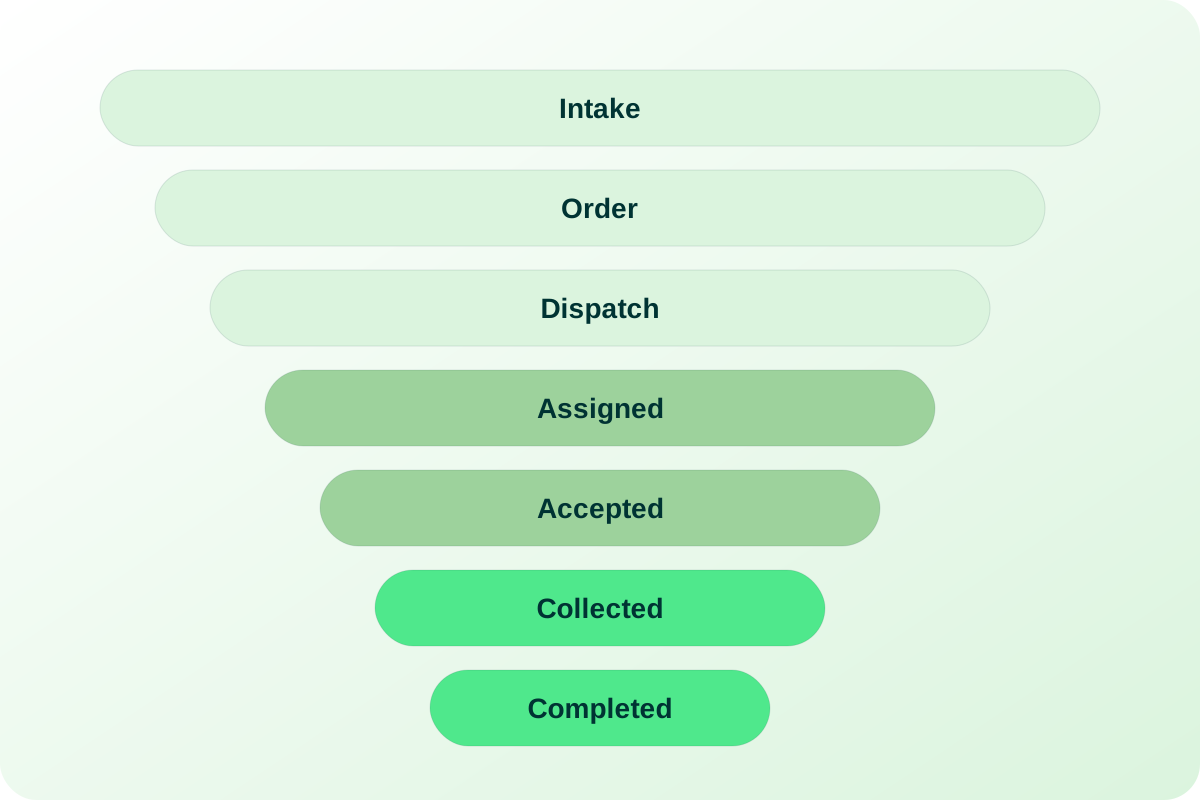
The spine of the product is one referral lifecycle, used unchanged on every screen and report: Referral Intake → Order Created → Pending Dispatch → Assigned to Field → Accepted by Tech (or Rejected → reassign) → Collected on DOS → Completed → Lab delivery, with the leakage states Service Hold, Cancelled and Pending Past DOS. The transitions between those stages are enforced by the API — a status card offers only the moves the current stage allows — and the dispatch board, the funnel report, the field activity report (FAR) and the dashboard all read the same status field, so 'dispatch rate' means the same thing to a dispatcher at 7 a.m. and to management at month end.

The blueprint also fixed what the operation needed beyond the funnel: urgency tiers (STAT, Urgent, Routine) with STAT sorting first everywhere; One-Time Visits and Standing Orders on cadences from daily to yearly; facility routines and AM/PM/STAT shift boards for LTC rounds; a chain-of-custody record per order; and a reporting layer that carries identifiers and categories only, never PHI. It was built first for a Southern California operator with field technicians across several regions, and the roles, funnel and field app apply to any organization that sends collectors to patients — draw-at-home programs, facility rounds, standing-order populations and STAT requests that have to be routed the same hour.

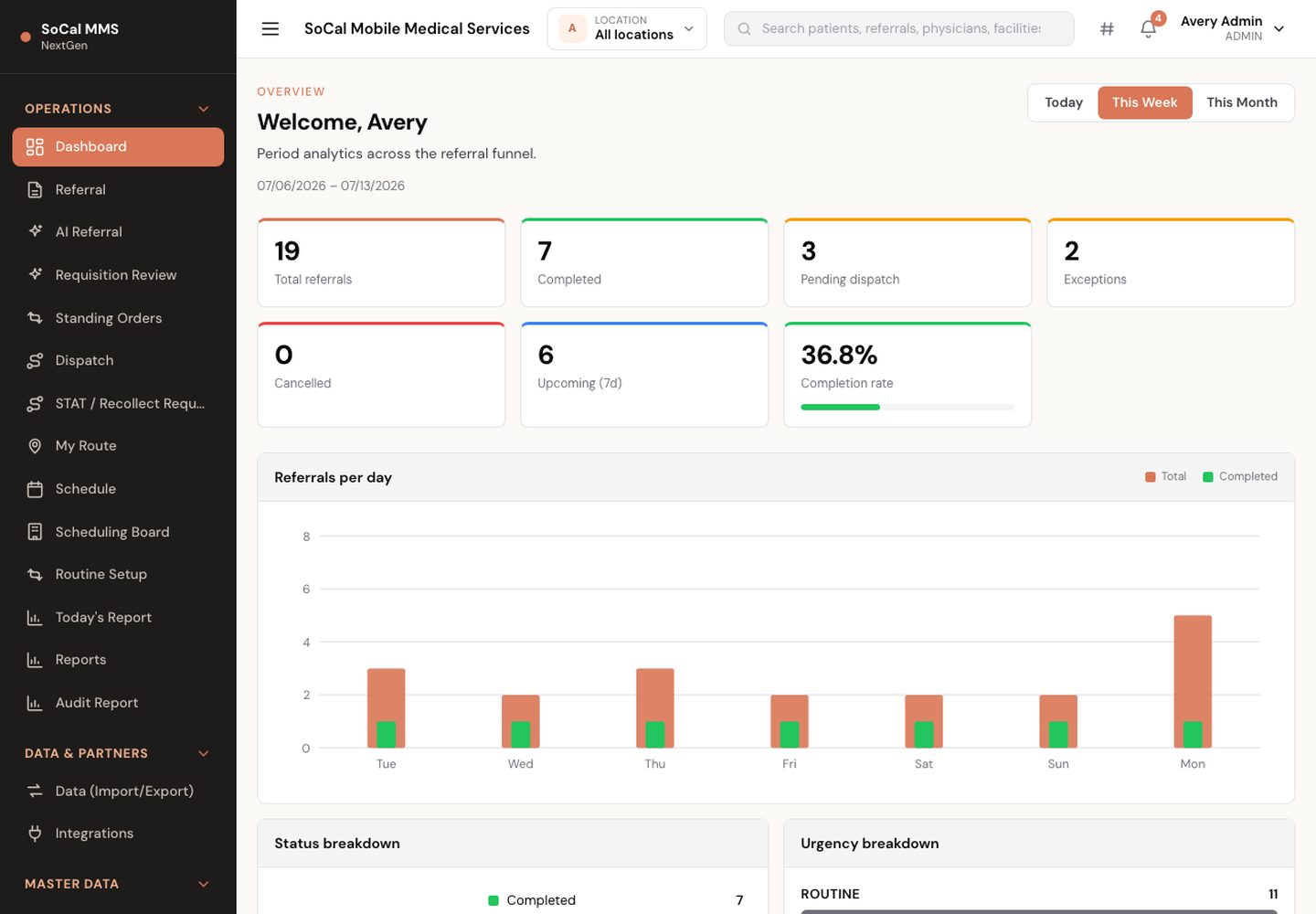
SoCal Solution — main screen
SoCal Solution — main screen (demo environment, synthetic data).
Who uses it

Built around the people doing the work

Intake staff

Needs · To turn a scanned, photographed or pasted requisition into a complete order without re-keying every field, to catch the duplicate patient before it becomes two orders, and to know which scans from the field still need a human.

Gets · AI Intake with confidence badges and multi-patient batches, a requisition review queue, a new-referral form that prefills from the patient's last order, duplicate detection, a status card that offers only the allowed next stages, and re-order and re-assign-patient actions.

Dispatcher

Needs · To see every open order by stage, plan LTC rounds by facility and shift, pick a technician who can reach the patient on the DOS, and never have two dispatchers grab the same job.

Gets · The funnel board, the facility-and-shift board with AM/PM/STAT slots and time-off warnings, ranked suggestions by region match and load, a 409 when someone else assigned first, and STAT and recollect triage on the same screen.

Field phlebotomist

Needs · A phone that opens on today's route with the STAT draws on top, lets them accept or reject, clock in and out, log a break and a requisition photo, and keeps working in a building with no signal.

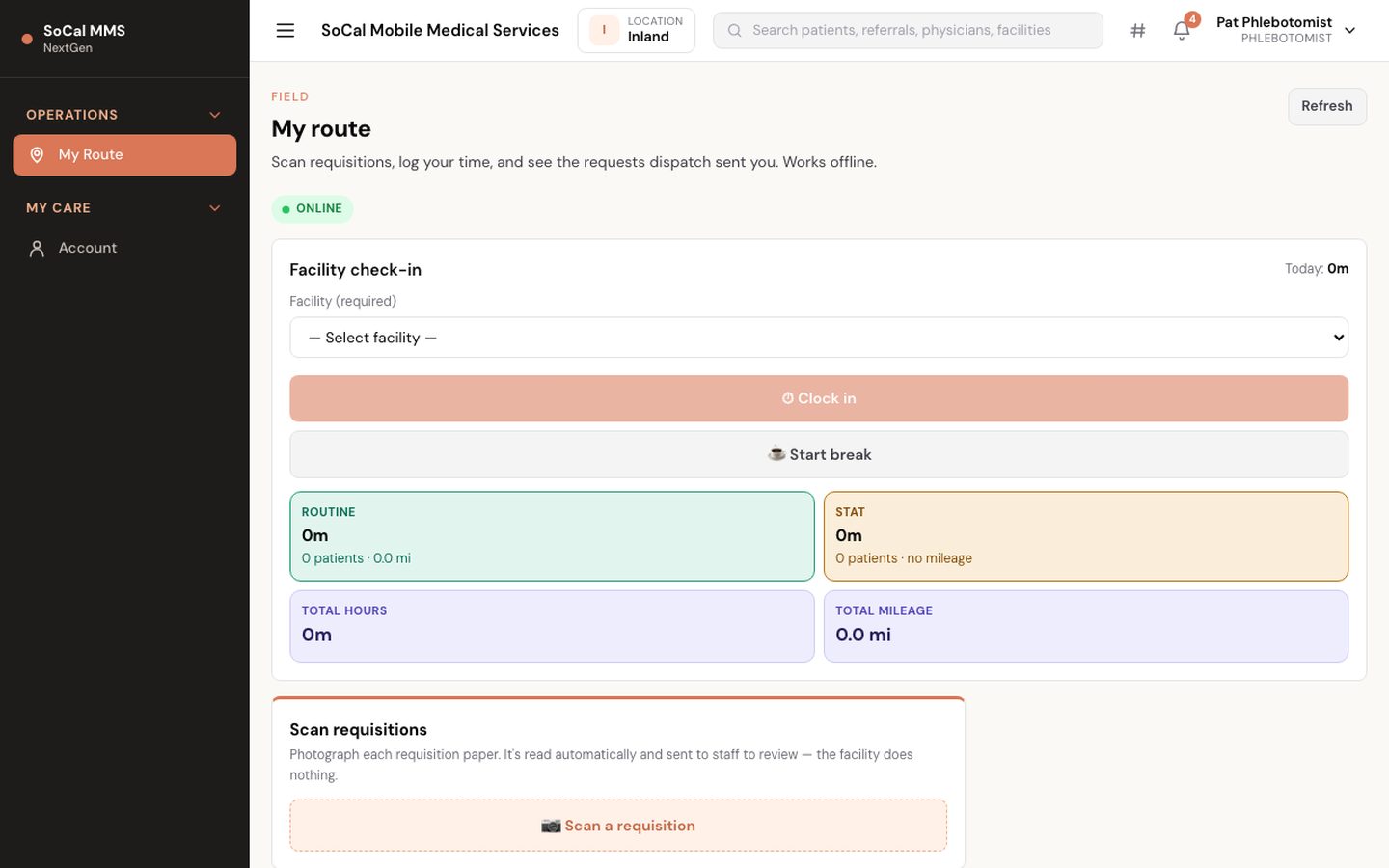
Gets · My Route grouped STAT → Urgent → Routine, accept/reject, clock-in by facility with automatic mileage, meal-break tracking, camera capture for requisitions, time-off requests, and an offline queue that replays once on reconnect.

Facility coordinator

Needs · To request STAT or Urgent draws for a batch of residents without a phone call, attach the requisition, and see when the sample was picked up and delivered.

Gets · A facility login scoped to one facility: batch requests with patient counts, requisition scan or spreadsheet upload to extract patients, and a status that advances from Pending through Picked up to Delivered.

Operations manager

Needs · One morning view of dispatch, completion and leakage, a per-technician activity report, hours and mileage for payroll, and an answer to 'who did what' when a specimen is questioned.

Gets · The location-scoped dashboard with deep-linking KPIs, the funnel and FAR reports, the time clock with break columns, the global audit trail, and a chain-of-custody timeline on every order.

Lab partner

Needs · To receive the orders that are coming, raise a recollect without calling, post result status back, and review exactly the specimens collected for their lab on a given day.

Gets · A laboratory login that lands on the audit report for its own lab, a STAT/recollect request form, and an organization record with an API key for inbound orders and result status.

Today vs. with eKlotho

What actually changes

AreaTodayWith SoCal Solution
Requisition intakeStaff retype each faxed or paper requisition into a 2009-era dispatch system; an unreadable field becomes a callback.AI extraction drafts the order from the scan, photo or pasted text with a confidence badge per field; staff review with the image alongside, and duplicates are flagged before save.
Assigning the jobA dispatcher scans a list, guesses who is closest, and sometimes two people assign the same order to two technicians.Ranked suggestions by region match and in-flight load; the second assignment attempt gets a 409, and only the winning technician is notified.
LTC roundsFacility visits are planned on a whiteboard and recurring contracts are remembered by one person.Routines generate ROUTINE visits on their weekdays and shift; the facility-and-shift board shows every slot, who is out, and which facilities are fully assigned.
In the fieldTechnicians call in to accept, write times and tube counts on paper, and lose edits when the signal drops in a facility basement.Accept, clock-in, collect and mileage happen in the field app; offline actions carry a client id and replay exactly once on reconnect.
STAT and recollectsUrgent requests live in text messages and get lost between shifts.Facilities and labs submit STAT and recollect requests with a status; staff triage them on the board, dispatch a STAT visit and notify the technician from the same card.
ReportingMonth-end spreadsheets, each defining 'dispatched' a little differently, and a lab that phones to ask what was collected.Dashboard, funnel, FAR and audit report read the same status and custody records; the lab logs in and downloads its own audit CSV for the DOS.
Capabilities

What's included

10 modules, each describing what is built today.

Referral intake & AI extraction

Requisitions arrive by upload, scan, photo or pasted text and become verified orders on an intake worklist built for the intake desk.

Master data & catalog

The domain entities from the blueprint — patients, physicians, referral sources, laboratories, facilities, services, tubes, tests, diagnosis codes, insurance — managed in one catalog manager.

Scheduling, standing orders & routines

One-time visits, recurring standing orders and facility contracts that generate visits on cadence instead of being remembered.

Dispatch board

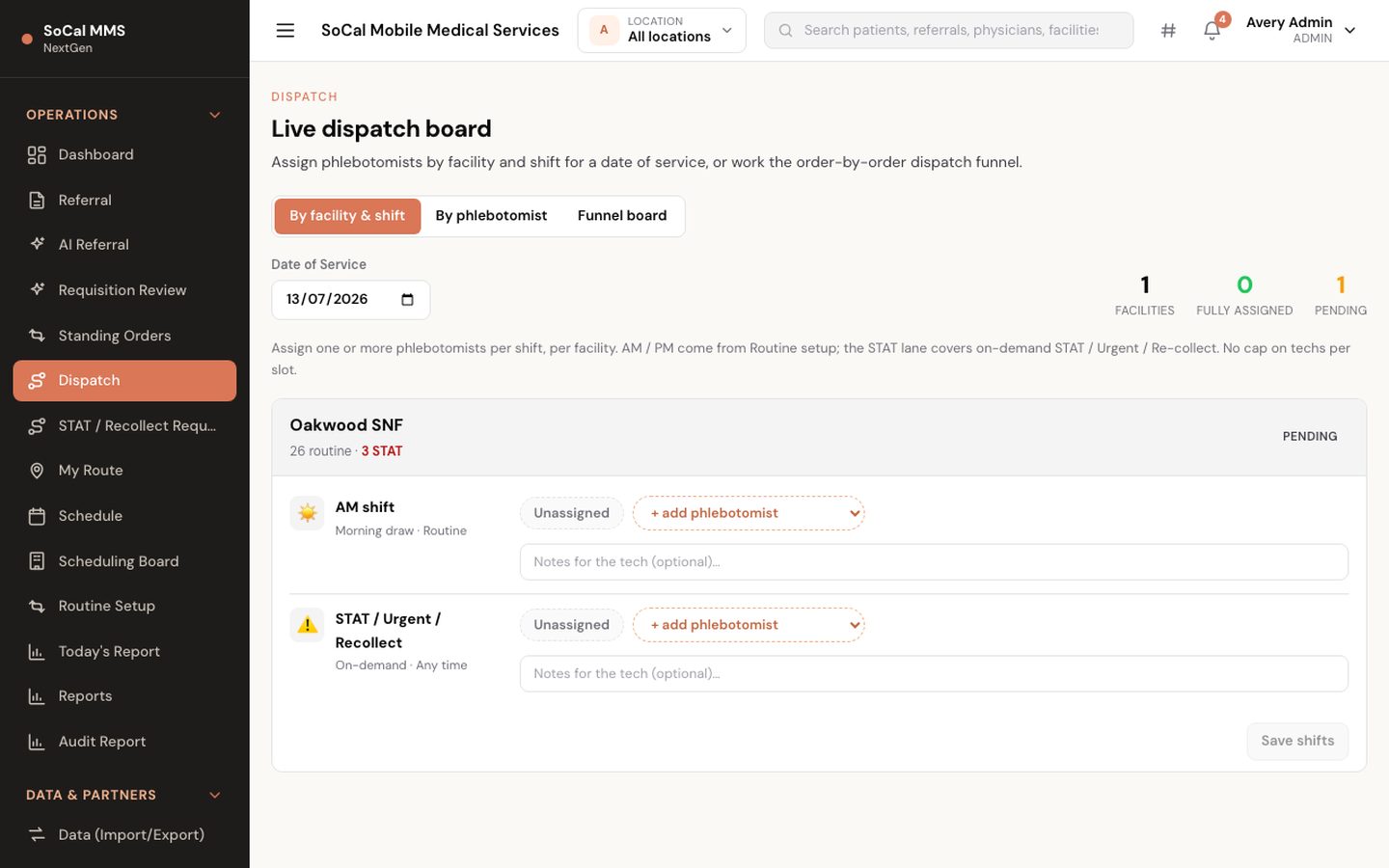
The dispatcher's workspace from the blueprint: a funnel board, a facility-and-shift board and a per-phlebotomist grid, with assignment that cannot be silently overwritten.

Field app (installable PWA)

The phlebotomist's day on a phone — the blueprint's largest opportunity, since the legacy system had no mobile-native field experience.

Facility requests, STAT & recollects

External facilities and laboratories get their own scoped logins, so urgent work arrives as a record instead of a text message.

Chain of custody & close-out

Every hand-off on an order is a record with an actor and a timestamp, and the day is closed from a worklist rather than from memory.

Reports & dashboards

The report set the blueprint carried forward — funnel, FAR, exceptions, today's worklist — computed from order data and scoped by location.

Interoperability & partner API

The order-to-result loop crosses organizational boundaries, so partners are registered organizations with keys, formats and an audit row on every crossing.

Administration, roles & audit

Seven roles, location scoping and an audit trail, so a hidden button is never the only thing protecting a record.

In depth

How it actually works

The lifecycle model

One funnel, everywhere

The operation this product replaces already thought in funnel terms — new orders, dispatched, exceptions — but the funnel lived only on a dashboard. Exceptions were found after the fact, reports were run at month end, and nothing stopped an order from being moved to a stage that made no sense. The rebuild kept the canonical stage names from that operation's own vocabulary — Referral Intake, Order Created, Pending Dispatch, Assigned to Field, Accepted by Tech, Collected on DOS, Completed — and made them the enforced spine of the system rather than a reporting convention.

AI intake

A requisition becomes an order

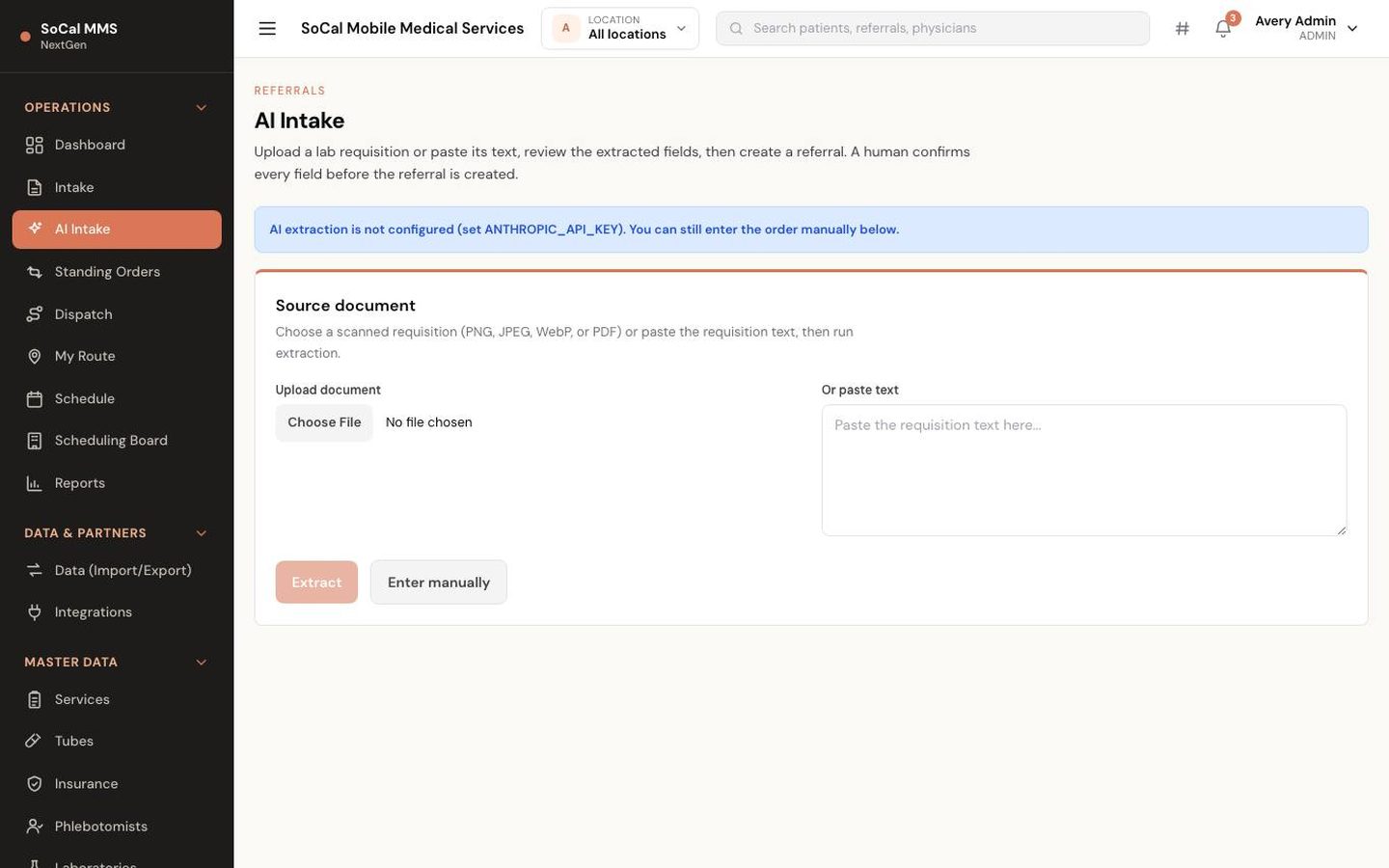
The intake desk receives paper requisitions from many laboratories and facilities, and each arrives on a different layout: dense checkbox test catalogs, handwritten tube notes like '2 SST 1 LAV', internal panel codes, accession-number labels, and write-in lines that only a human can read with confidence. The extraction design was built against four real-world requisition families chosen for exactly those quirks, so the pipeline is tuned to the messy forms an intake desk actually sees, not to a clean sample document.

Assignment mechanics

Dispatch without double-booking

The service design matches an order to the technician whose region contains the patient, then refines by current load — how much is already on that technician's day. The board turns that into a ranked suggestion list: one click assigns the top candidate, Auto-assign takes it without the click, and manual choice is always available, because the dispatcher knows things the score does not. Long-term-care rounds are planned separately on the facility-and-shift board, where a whole facility's AM, PM and STAT slots are staffed at once.

Field operations

A day in the field app

A phlebotomist who signs in does not land on a dashboard: the app routes the role straight to My Route, today's stops grouped STAT first, then Urgent, then Routine, because the first question in the field is 'what is most urgent right now'. The redirect is a hard navigation so the fresh session travels with the very first request — a deliberate fix for first logins on a new phone. Tabs switch to the Schedule calendar and the patient list without leaving the app.

Recurring work

Standing orders that don't expire silently

A standing order is a template, not a to-do: patient, service, target lab, urgency, a cadence from daily through weekly, biweekly and monthly up to yearly, a weekday pattern, and a start and end date. Generate visits turns the template into real referrals — one per occurrence — and each generated visit enters the same funnel as any one-time order, so recurring work is dispatched, collected and audited with no special path.

How it works

From first step to outcome

  1. Referral received

    A requisition arrives by portal upload, scan, field photo or pasted text, or as a normalized order from a partner organization; AI extraction drafts the order for intake to verify.

  2. Order created

    Intake confirms patient, physician, referral source, insurance identifiers and facility; sets service, tubes, diagnosis codes, tests and target laboratory; chooses One-Time Visit or Standing Order and the urgency tier.

  3. Pending dispatch

    The order lands on the board. The dispatcher takes a ranked suggestion by region and load, auto-assigns, or assigns manually; LTC rounds are planned on the facility-and-shift board. An order whose DOS passes uncollected falls to Pending Past DOS and is raised for recovery or cancellation.

  4. Accepted by tech

    The technician accepts in the field app or rejects it back to Pending Dispatch; assignment notifications go out by SMS when configured.

  5. Collected on DOS

    The technician clocks in at the facility, collects on the date of service, records it — offline if necessary — and the chain-of-custody event is written.

  6. Completed and audited

    Staff close collected orders from Today's report; the lab reviews its audit report for that DOS; result status posted by the lab is recorded on the order. Completed is not a dead end — a duplicate can still be reversed, and the reversal cleans the audit trail behind it.

  7. Measured

    The dashboard, funnel and FAR show the day against the KPIs the blueprint tracks, and orders export as CSV or JSON.

A closer look

Screens and flows

Dispatch board
Dispatch board — orders by funnel stage with assignment and conflict protection (demo environment, synthetic data).
Field app — my route
Field app — my route — the technician's stops for the day with accept and collect actions (demo environment, synthetic data).
AI requisition intake
AI requisition intake — a scanned requisition extracted into a draft order for review (demo environment, synthetic data).
How we make sure

The mechanics behind the claims

Every promise on this page maps to something the software actually enforces.

The board and the reports agree
Dispatch, funnel, FAR, Today's report and the dashboard all read one referral status field (Intake, Pending Dispatch, Assigned, Accepted, Collected, Completed, Service Hold, Cancelled, Rejected, Past DOS). The allowed transitions live in a single transition table, and the UI offers only those moves.
Two dispatchers cannot assign the same order
The expected current assignee travels with the assignment write and is checked inside the database update itself, not in a read-then-write. A stale expectation returns HTTP 409 with a reload prompt, one custody row is written, and only the winning technician receives the SMS.
Offline actions never double-post
Every field write carries a client action id that is unique in the database; a replay returns the original result rather than creating a second row, only the original actor may replay it, and the queue retries inside dead zones where the browser still reports online.
Custody is a record, not a recollection
Assignment, accept, reject, collection and status notes each create a chain-of-custody row with event, actor and timestamp. The lab audit report is built from those rows; an order reversed to Rejected or Cancelled after completion loses its collection timestamps and leaves the audit report.
Roles see only their scope
Office worklists use a fail-closed allowlist (Admin, Intake, Dispatcher); the Laboratory role is pinned to its lab, the Facility role to its facility, the Phlebotomist to its own assignments, and the Patient to its own appointments. Every scoped list is filtered on the server, not only hidden in the nav.
Partners only do what their type allows
Organizations carry a hashed API key, a type and a direction; referring organizations may post orders but not results, only laboratories may post result status, and every inbound order, import, export and key issuance writes an audit-log row.
Outcomes

What changes for your team

  • One funnel vocabulary shared by intake, dispatch, the field, the lab and management
  • Holds, rejections and past-DOS orders visible on the board the same day, not discovered at month end
  • Standing orders and facility routines that generate visits on cadence
  • Technicians working from a phone that keeps working without signal
  • STAT and recollect requests that arrive as records with status and notifications
  • Partner orders and result status exchanged by API with an audit row on every crossing
FAQ

Common questions

Terms on this page

DOS
Date of service — the day the draw is scheduled; an order past this date without a collection falls into Pending Past DOS.
Funnel stage
The single status an order is in: Referral Intake, Order Created, Pending Dispatch, Assigned to Field, Accepted by Tech, Collected on DOS, Completed, or a leakage state (Service Hold, Cancelled, Pending Past DOS).
FAR
Field activity report — per-phlebotomist counts of orders assigned, accepted and completed for a period.
STAT / Urgent / Routine
The three urgency tiers. STAT sorts first on every board and route and can be raised as a STAT request that dispatches and notifies a technician; Routine draws are batched into regular facility routes.
Standing order
A recurring draw on a cadence from daily to yearly with start and end dates and weekday pattern, generating one referral per scheduled visit.
Routine
A facility contract — shift, weekdays, patient range and pre-assigned phlebotomists — that auto-generates ROUTINE dispatch visits for long-term-care rounds.
Chain of custody
The ordered log of who handled an order and when — assignment, accept, reject, collection — used to build the lab audit report.
Service Hold
A leakage state for an order blocked by an eligibility, order or access issue, tracked until it is released back to Pending Dispatch or cancelled.
One-Time Visit
A referral for a single dated draw with one DOS — the counterpart of a standing order, which generates a visit per occurrence of its cadence.
Recollect
A request — raised by a laboratory, a facility or staff on their behalf — to re-draw a specimen that was insufficient or compromised; triaged as a card that can notify chosen technicians or dispatch a new STAT visit.
Where do the KPIs on the dashboard come from?

From the blueprint's service KPIs — dispatch rate, accept rate, on-time-DOS rate, exception rate, completion latency, technician utilization and standing-order adherence — computed from your own order data. The planning targets in the blueprint (for example a dispatch rate of 95% or better and an exception rate of 1% or less) are goals to configure against, not results this product claims.

Is this only for one operator?

It was designed for a Southern California mobile-phlebotomy operation first, but the roles, the funnel, the facility and lab portals and the field app apply to any draw-at-home or facility-rounds service.

Is the dispatch board real-time?

It refreshes on demand, and the assignment write is protected: if someone else assigned the order first you receive a 409 and a prompt to reload. Live push over WebSocket or SSE is on the roadmap.

What happens when a technician rejects a job?

The order returns to Pending Dispatch and the dispatcher — or a ranked suggestion — reassigns it. Rejections are part of the funnel, so reassignment churn is visible in the FAR and the exceptions count.

Does the field app work without a signal?

Yes. It is an installable web app; accept, reject, collect and mileage actions taken offline are queued and replayed exactly once when connectivity returns, and the queue keeps retrying inside dead zones.

How do laboratories and referring organizations connect?

Each is registered as an organization with a type, direction and format and receives an API key shown once. Referring organizations post normalized orders; laboratories post result status, which is recorded on the order. HL7 v2, FHIR and SFTP transports are on the roadmap.

Can patients use it?

A patient login sees its own upcoming and recent collections, read-only. Appointment confirmation and rescheduling from the patient portal are a later phase.

What happens when the date of service passes without a collection?

The order falls into Pending Past DOS — a named leakage state, not a silent gap. It raises an entry in the staff notifications feed, counts toward the dashboard's exceptions, and can only move to Pending Dispatch (recovered and reassigned) or Cancelled, so every missed DOS ends in an explicit decision.

Can a completed order be corrected afterwards?

Yes — Completed is deliberately not terminal. An order closed in error, for example a duplicate, can be moved to Rejected or Cancelled; the reversal nulls its collection and completion timestamps and removes it from the lab's audit report, so a correction never leaves a phantom collection in the record handed to the laboratory.

See SoCal Solution on your own workflows

We walk through it with your data and your team — not a canned demo.

Program and billing eligibility are determined by each practice and its payers. Results and alerts do not constitute a medical diagnosis. Third-party names are trademarks of their respective owners and do not imply endorsement.