Remote Patient Monitoring

Run the RPM program, not the spreadsheet behind it.

rpm.eklotho.com is the program-management workspace for Remote Patient Monitoring (RPM): enrolled patients, device inventory, a reading-day board that counts toward the 16-day month, threshold and compliance rules evaluated as readings land, an emergency stream, and care-time tiers that a practice can hand to its billing team as facts.

Overview

Device readings, alerts and monthly compliance for a Remote Patient Monitoring program, on one patient record.

Remote Patient Monitoring (RPM) asks patients to measure at home — blood pressure, weight, glucose, oxygen saturation (SpO₂), temperature — and asks a care team to watch those readings between visits. The program side is where it gets hard: which patients are on track for the month, which devices have gone quiet, which readings need a call today, and how many minutes of care time were spent per patient. rpm.eklotho.com is built for that program side. It is the workspace for the program director, the care managers and the clinic staff who run RPM, and it sits on the same patient record as the eKlotho EMR, so a reading arrives once and everyone delegated to that patient sees it.

The app follows a fixed screen map. A program dashboard shows enrollment, reading-day eligibility, care-time tiers, device health, open alerts and workload per care manager. An enrolled-patients list opens into a per-patient overview with the vitals trend, time log, devices and alert history. A monthly board counts distinct reading days toward 16 and shows each patient's care-time tier. An alert inbox carries threshold and compliance rules; an emergency stream carries critical readings and patient SOS. Device inventory, a personal time log and compliance exports round it out. Roles are simple: directors and care managers see the program, clinic staff see their own panel.

Three rules from the original eKlotho program are preserved on purpose. A reading day is a calendar day in the program's time zone with at least one device reading, counted once no matter how many sensors reported. Care time is tiered in twenty-minute buckets — the first 20 minutes, the next 20, the next 20 — computed by the server from an append-only log. And logging time from an alert resolves that alert, so the work and the record happen in one motion. What the app deliberately does not do is count money: reading days and tiers are compliance facts, and billing eligibility stays with the practice and its payers.
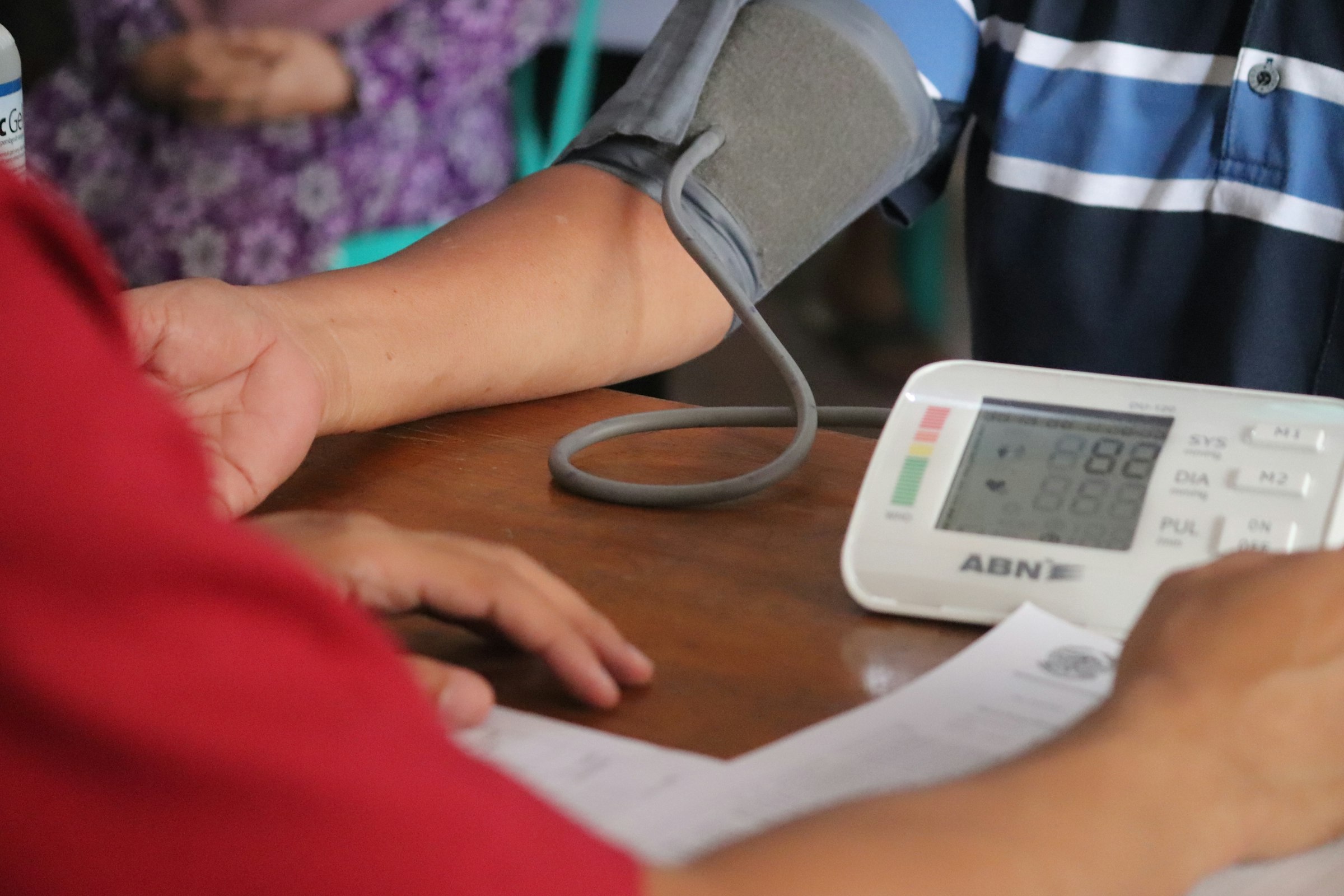
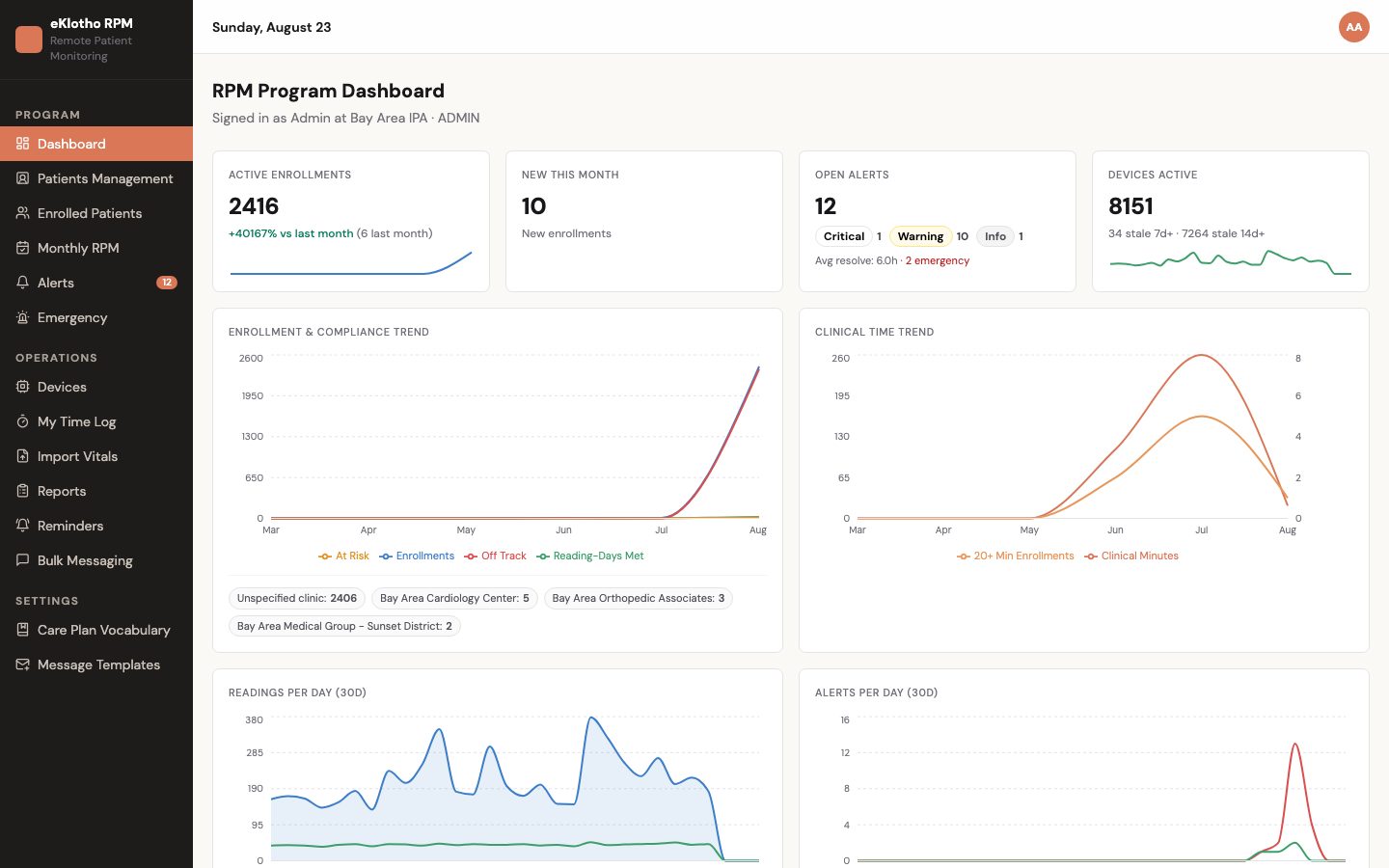
Remote Patient Monitoring — main screen
Remote Patient Monitoring — main screen (demo environment, synthetic data).
Who uses it

Built around the people doing the work

RPM program director

Needs · A daily answer to three questions: who is on track for 16 reading days, which devices have gone quiet, and how the caseload is spread across care managers.

Gets · The program dashboard with enrollment by clinic, reading-day eligibility (met, at risk, off track), tier distribution, stale-device counts, open alerts by severity and a workload row per care manager — plus the monthly board and compliance exports.

Care manager

Needs · One place to work a patient: see the trend, act on the alert, log the minutes, message the patient, set a reminder, move on.

Gets · The alert inbox with severity and lifecycle, the per-patient overview with vitals trend, devices, time log and reminders, a timer that logs time straight from an alert and closes it, and messaging with templates and merge variables.

RPM nurse

Needs · To triage the readings that matter first and be confident nothing critical is sitting unread.

Gets · Threshold alerts with info, warn and critical severity; a separate emergency stream for critical vitals and patient SOS with acknowledge-and-resolve; duplicate suppression so one bad morning does not become ten alerts.

Clinician at the clinic

Needs · At-home readings in the chart they already use, without a second login.

Gets · The RPM tab on the eKlotho EMR chart — one sub-tab per vital with trend, threshold breaches and the device list — and an at-a-glance card in the encounter so the readings are visible beside the note. Read-only by design; the program workflow stays in rpm.eklotho.com.

Patient

Needs · A simple way to take a reading and confidence that someone is watching.

Gets · The eKlotho phone and tablet apps for pairing and measuring, an SOS button with emergency contacts, and a patient account on eklotho.com with latest readings, trends, devices, alerts, visits, care-plan to-dos and medications.

Billing and compliance lead

Needs · Defensible facts per patient per month — reading days, minutes, tier, device setup — without rebuilding them from logs.

Gets · A month-end snapshot per enrollment (distinct reading days, 16-day met flag, per-sensor day counts, minutes and tier, setup status), the monthly compliance CSV, and a time log where the only correction is an invalidation with a reason.

Today vs. with eKlotho

What actually changes

AreaTodayWith Remote Patient Monitoring
Where readings liveIn the device vendor's portal; staff re-key or screenshot what they need into the chart.On the same patient record the EMR uses. The clinician sees the RPM tab in the chart; the care team works the same rows in rpm.eklotho.com.
Duplicate and impossible readingsA retrying cuff posts the same reading twice; an SpO₂ of 120 sits in the trend until someone notices.Ingest is idempotent on device and measurement time, and values are range-checked before they are stored.
Finding the reading that mattersSomeone scans every reading every morning and hopes the high one stands out.Thresholds and program rules are evaluated as each reading lands; the care manager opens an inbox of alerts with severity, not a list of readings.
Quiet devicesA patient stops measuring on the 3rd and nobody notices until the 16-day count fails on the 31st.A not-measured-in-N-days rule raises a compliance alert, and the device list flags staleness at 7 and 14 days without a reading.
Counting minutesMinutes are typed into a spreadsheet from memory; tiers are worked out at month end.Time is logged from a timer, a manual entry or an alert; the server computes duration and the 20/40/60-minute tier as the month goes.
Showing the monthA month-end project: pull exports, count days, reconcile minutes, hope it holds up.The monthly board shows reading days and tiers every day; a nightly recompute and the CSV export carry the month to the billing team.
Capabilities

What's included

10 modules, each describing what is built today.

Program dashboard

The director's daily view of the program: enrollment, eligibility, adherence, alerts and workload, with no revenue widgets.

Enrolled patients and patient overview

An enrollment-driven list — not a list of readings — that opens into everything the care team needs for one patient.

Devices and patient apps

Provision devices, assign them to patients with a measurement schedule, and keep the fleet healthy.

Readings ingest

A device API designed for real hardware and real networks: idempotent, rate-limited and validated.

Alert rules and inbox

Program-level defaults with per-patient overrides, evaluated as readings land and on a daily compliance scan.

Emergency stream

Critical readings, patient SOS and staff-reported emergencies in one stream the whole team watches.

Monthly RPM board

The month, patient by patient: distinct reading days toward 16, per-sensor counts, minutes and tier, setup and review state.

Time log

Append-only care-time logs that compute the tier for you, from the patient overview or the care manager's own log.

Messaging and reminders

Reach patients and keep follow-ups from slipping, without leaving the workspace.

Reports and the EMR chart

Carry the month to the billing team and the readings to the clinician.

In depth

How it actually works

The ingest pipeline

From cuff to alert in one transaction

When a blood-pressure cuff finishes inflating in a patient's kitchen, the eKlotho app posts the reading to the device API using that device's own key. Before anything is stored, the server checks the key, rejects readings from retired or suspended devices, range-checks the value against physiological limits, and looks for a duplicate — the same device reporting the same measurement time. A retrying device gets the already-stored reading back, marked as a duplicate, as a success — so firmware never loops on an error.

Monthly compliance

The 16-day engine

The number at the center of the monthly board — distinct reading days toward 16 — is produced by a deliberately small engine. Each device reading's timestamp is converted to the calendar day it fell on in the program's time zone, so a cuff used at 11 pm counts for the day the patient experienced, not the day a server clock recorded. Distinct days are then counted once each, no matter how many sensors reported that day. Every device-sourced vital counts, including SpO₂; manual entries and invalidated readings never do.

Program defaults, patient exceptions

Two-level alert rules

Alert rules live at two levels. The program sets entity-wide defaults: per-metric high and low bounds, an immediate-fire flag, consecutive-day triggers, and a not-measured-in-N-days window with per-sensor switches. Where one patient needs different limits — a tighter blood-pressure band after a medication change, a looser glucose range — a per-patient rule row overrides the default. The engine always uses the patient's row when one exists and the program's otherwise, so an exception never means editing the program rule.

When it cannot wait

The emergency stream

Some events should never queue behind routine alerts, so they have their own stream. Three sources feed it: a reading in the critical band — the kind of value that ends a triage discussion; an SOS pressed in the patient's app, which arrives carrying the patient's message and location; and a manual report entered by staff who learned of an emergency another way.

The patient side

What the patient sees

A monitoring program only works if measuring at home is easy, so the patient side is deliberately simple. The eKlotho phone app and the Android tablet hub pair the blood-pressure cuff, scale, glucometer, pulse oximeter and thermometer over Bluetooth, read each measurement, and upload it — in a batch later if the connection was down when the reading was taken. The same apps carry manual entry, the SOS button with emergency contacts, medications and upcoming visits.

How it works

From first step to outcome

  1. Enroll and provision

    Enroll the patient with consent details and a care manager, provision devices with a measurement schedule, and pair them in the eKlotho app. Device setup is recorded from the first transmitted reading.

  2. Measure at home

    The cuff, scale, glucometer, pulse oximeter or thermometer reports through the app; the app also supports manual entry and offline batches.

  3. Evaluate on arrival

    Each reading is validated, stored and checked against thresholds and immediate rules in one transaction; the daily scan adds consecutive-day and not-measured alerts.

  4. Work the queues

    Care managers triage the alert inbox and the emergency stream, log time from the alert, message patients and set reminders.

  5. Watch the month

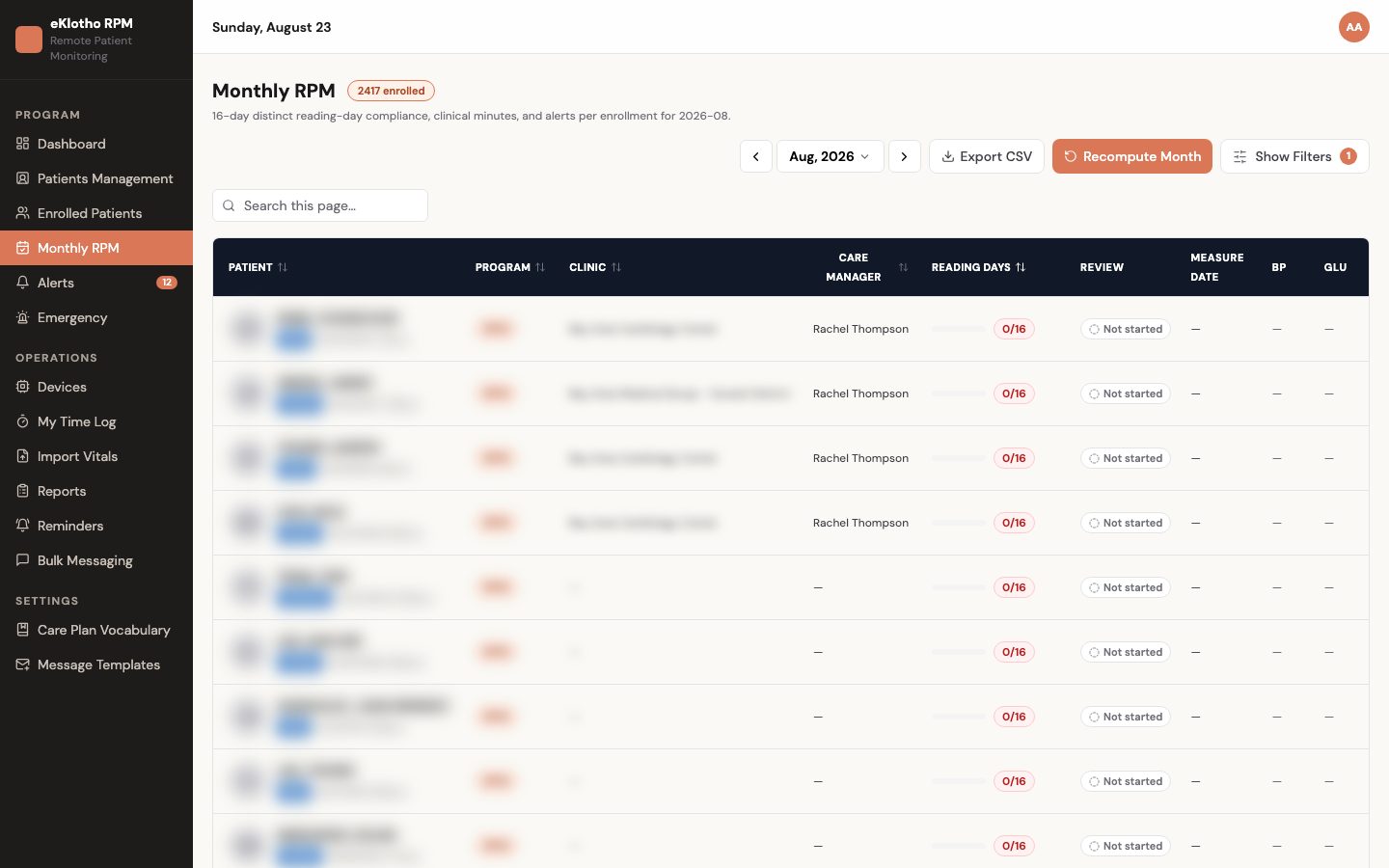
    The monthly board shows reading days toward 16 and the care-time tier per patient every day, not at month end.

  6. Export and share

    The compliance CSV goes to the billing team; the clinician sees the same readings on the EMR chart.

A closer look

Screens and flows

Monthly RPM board
Monthly RPM board — distinct reading days, minutes and review status per enrolled patient (demo environment, synthetic data).
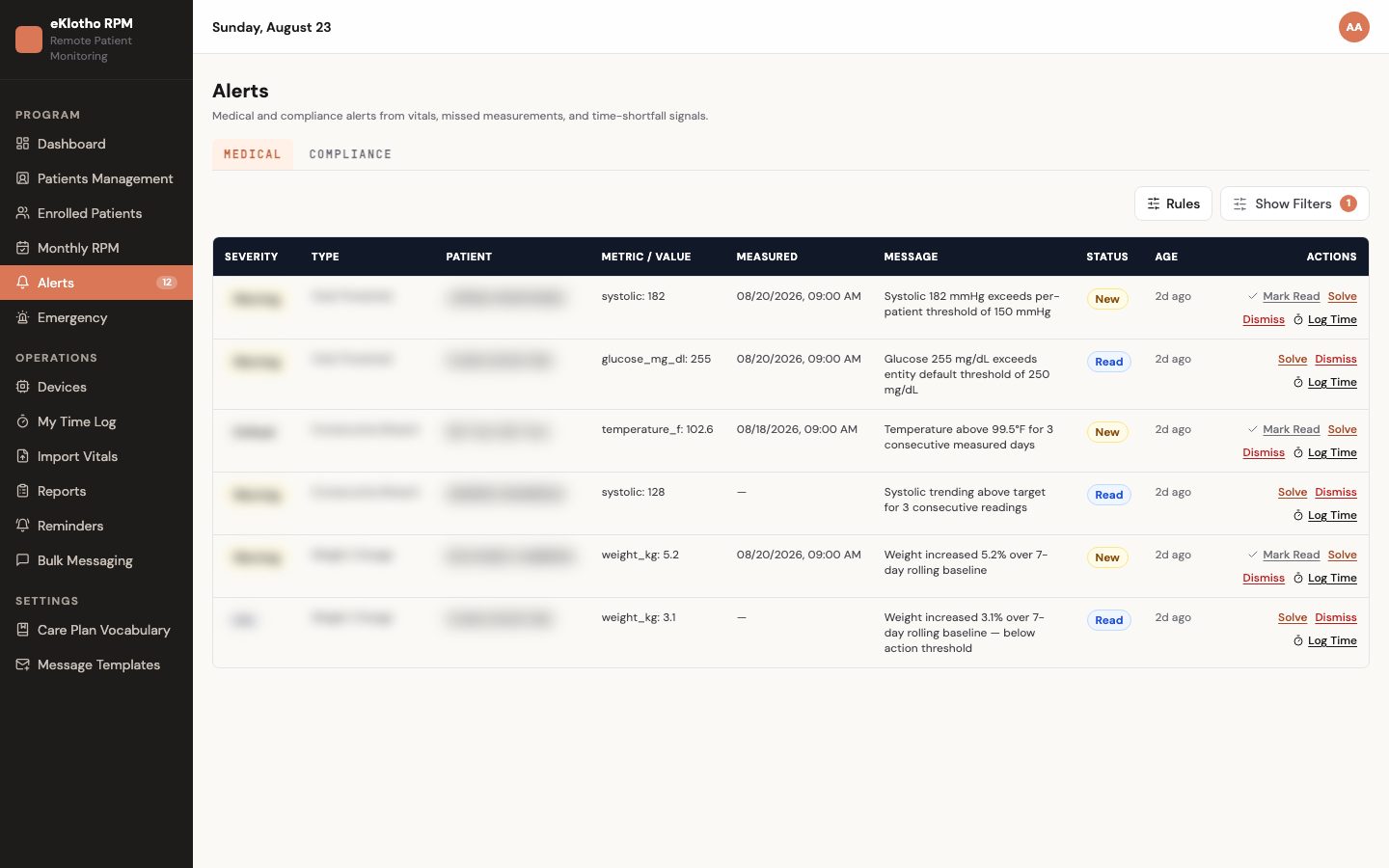
Alert inbox
Alert inbox — medical and compliance alerts with severity, metric, message and actions (demo environment, synthetic data).
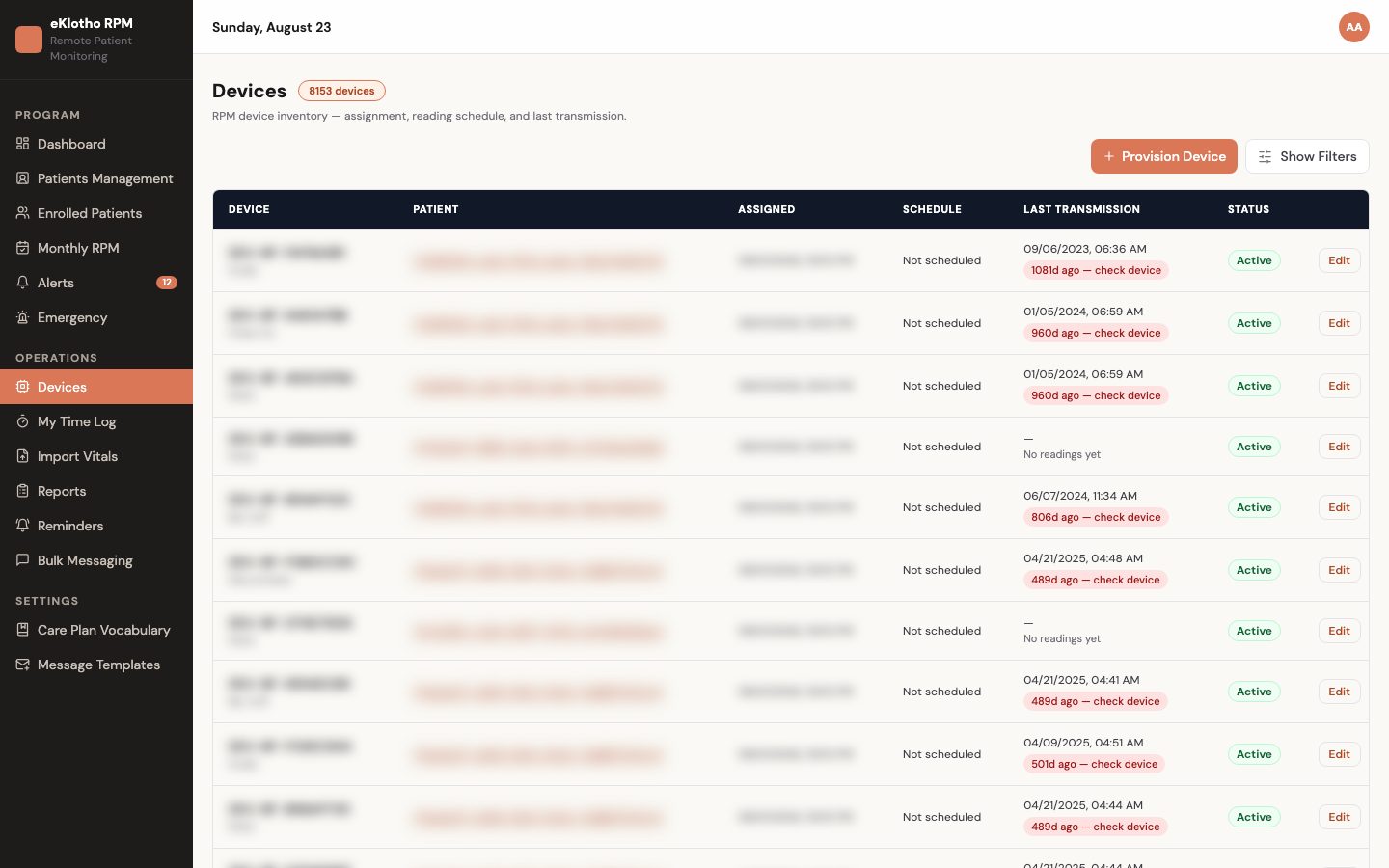
Device inventory
Device inventory — devices by patient with status, schedule and staleness (demo environment, synthetic data).
How we make sure

The mechanics behind the claims

Every promise on this page maps to something the software actually enforces.

A retrying device never creates a duplicate
Readings are unique on device and measurement time. A second delivery of the same reading returns the existing row marked as a duplicate — a success, not an error — so device firmware never retries forever.
Alerts are raised the moment a reading lands
Threshold and immediate-fire rule evaluation runs inside the same database transaction as the insert. Either the reading and its alerts are both saved, or neither is. Consecutive-day and not-measured rules run on a daily scan.
A reading day is counted once, in local time
The monthly engine converts each device reading to a calendar day in the program's time zone and counts distinct days. Manual entries and invalidated readings do not count. The prior month is recomputed through the 4th for late store-and-forward readings, then frozen.
Minutes cannot be over-counted
Time logs are append-only. The server computes duration from start and end, rejects an entry that ends before it starts or exceeds the per-entry cap, and the only edit allowed is invalidation with a reason — the original row stays.
Program rules, patient exceptions
Each rule is an entity-level default with optional per-patient override rows; the engine uses the patient's row when one exists, otherwise the program default. Open alerts of the same patient, type and metric suppress a re-fire.
A clinic only sees its own patients
Every list and write is scoped by the organization in the signed-in user's token, never by the request body. Patient-level access is checked inside that scope, and a record outside it returns not-found rather than forbidden.
Outcomes

What changes for your team

  • Every enrolled patient's progress toward 16 reading days is visible daily, so the program can act before the month closes
  • Critical threshold breaches reach the assigned care manager as the reading lands, with an acknowledgment trail
  • Quiet devices are flagged at 7 and 14 days and raised as compliance alerts, before a patient falls off track
  • Care time is tiered by the server from an append-only log, so month-end minutes are a download rather than a reconciliation
  • Clinicians see at-home readings in the chart without switching to a separate RPM application
  • Readings, alerts and time live on one patient record across the network — no vendor portal, no duplicate copies
FAQ

Common questions

Terms on this page

RPM
Remote Patient Monitoring — patients measure at home with connected devices and a care team reviews the readings between visits.
Reading day
A calendar day, in the program's time zone, on which at least one device reading arrived for the patient. The monthly board counts distinct days toward 16; a day counts once regardless of how many sensors reported.
Care-time tier
The twenty-minute bucket a patient's logged minutes fall into for the month — first 20, next 20, next 20 — shown as 20, 40 or 60-plus. Computed by the server, never typed.
Threshold vs. rule
A threshold compares one reading to a limit and fires immediately; a rule looks across days — consecutive days out of range, not measured in N days, weight change percentage.
Emergency stream
A separate inbox for critical readings, patient SOS and staff-reported emergencies, with an acknowledge-then-resolve flow, kept apart from routine alerts.
Enrollment
The record that puts a patient in the RPM program with a status, consent details and an assigned care manager. Monthly compliance is tracked per enrollment.
Stale device
A device with no reading for 7 days (warning) or 14 days (critical). Shown in the device inventory, on the dashboard and as a pill on the EMR chart.
Mobile API
The versioned, patient-facing API the eKlotho phone and tablet apps and the eklotho.com account use — login, latest and historical vitals, batch upload, devices, alerts, medications, appointments, care-plan tasks, emergency contacts and SOS.
Idempotent ingest
The same reading delivered twice — a retrying cuff, a re-sent offline batch — is stored once. The second delivery simply gets the already-stored row back as a success.
Month freeze
After month end, the prior month keeps recomputing through the 4th to absorb late store-and-forward readings, then freezes. A frozen month's reading days and tiers no longer change.
Which vitals are supported?

Blood pressure with heart rate, weight, glucose, SpO₂ and temperature — from Bluetooth devices paired to the eKlotho app, from manual entry, or from a CSV import of historical readings.

How is a reading day counted?

A reading day is a calendar day in the program's time zone with at least one device reading. It counts once no matter how many sensors reported. Manual entries do not count. The board shows distinct days toward 16 plus per-sensor day counts so you can see which devices carried the month.

How does care time become a tier?

The care manager logs time with a timer, a manual entry or from an alert. The server computes the duration and keeps a running month-to-date total; the tier is the twenty-minute bucket that total falls into — 20, 40 or 60-plus minutes.

Does the program track billing dollars?

No. It records compliance facts — reading days, device setup, minutes and tiers — and exports them. Whether a month is billable is determined by the practice and its payers in their billing systems.

How do alerts reach the care team?

Threshold and rule alerts appear in the alert inbox with severity and create an in-app notification for the assigned care manager. Critical readings and SOS appear in the emergency stream. Email and SMS fan-out from emergencies is on the roadmap.

What do patients use?

The eKlotho phone app and Android tablet hub for pairing, measuring, manual entry, offline batches and SOS, and a patient account on eklotho.com with readings, trends, devices, alerts, visits and care-plan to-dos. Both are served by the Mobile API and are being connected to this platform.

We have readings from a previous vendor. Can we bring them in?

Yes. The vitals CSV import takes one measurement per row, validates every row first and writes nothing unless all rows pass. A dry-run mode lists the problems without importing.

What happens when a device goes quiet?

Staleness shows at 7 days (warning) and 14 days (critical) in the device inventory, on the dashboard and as a pill on the EMR chart. Separately, a not-measured-in-N-days rule — configurable per sensor — raises a compliance alert to the assigned care manager, so a patient who stopped measuring on the 3rd is a task that week, not a surprise on the 31st.

Can alert thresholds differ per patient?

Yes. Rules are entity-level defaults with optional per-patient override rows; the engine uses the patient's row when one exists and the program default otherwise. Overriding one patient never edits the program rule, and an open alert of the same patient, type and metric suppresses a re-fire.

See Remote Patient Monitoring on your own workflows

We walk through it with your data and your team — not a canned demo.

Program and billing eligibility are determined by each practice and its payers. Results and alerts do not constitute a medical diagnosis. Third-party names are trademarks of their respective owners and do not imply endorsement.