EMR Solution

The clinical EMR born inside the network's patient record.

The eKlotho EMR is where clinicians chart, prescribe, order and bill — built on the same patient record the health plan and the IPA already manage. Inbox, charting, e-prescribing, labs, imaging, referrals, an AI ambient scribe, telehealth workflow, encounter billing, reports and practice settings, with coverage, care gaps and risk context in the chart.

Overview

A network-native EMR — the chart and the business of care on one record.

Most EMRs stop at the clinic wall. Payers, delegation, authorizations and quality live somewhere else, reconciled by interface engines, fax and phone. The eKlotho EMR is the clinical surface of a network platform: it shares the Nexus patient record and entity graph, so the patient in the chart is the same patient the plan covers and the IPA reports on. There is no second copy and no nightly sync. A clinician opens the inbox, sees today's patients, documents the visit — often from an AI-drafted note — sends the prescription, orders the labs and signs, and the signed encounter is already visible to billing, quality and the network.

That does not make it only for network clinics. A standalone practice gets a complete EMR: an inbox-driven workflow, full coded charting, vendor-connected e-prescribing, lab and imaging orders, referrals, an ambient scribe, telehealth workflow, encounter billing, portal administration, reports and practice settings. A clinic inside an IPA additionally gets what no clinic-only EMR can offer — a referral that opens the IPA's own prior-authorization queue under the delegation contract, care gaps and RAF/HCC (risk-adjustment) context in the chart, and cross-clinic continuity on one record when a patient moves between sites.

The chart is organized the way clinicians think: demographics and insurance preloaded from the shared record, a problem list coded in ICD-10, medications in RxNorm, allergies, immunizations, vitals, assessments and screenings, labs with LOINC codes, imaging, referrals, prescriptions, documents, consent and billing history, with RPM and CCM (remote monitoring and chronic care management) context and PACE sections where they apply. Signed notes lock and change only by addendum; patient timelines, merges and the per-chart access log are append-only, so the record can always answer what changed, when, and who did it.

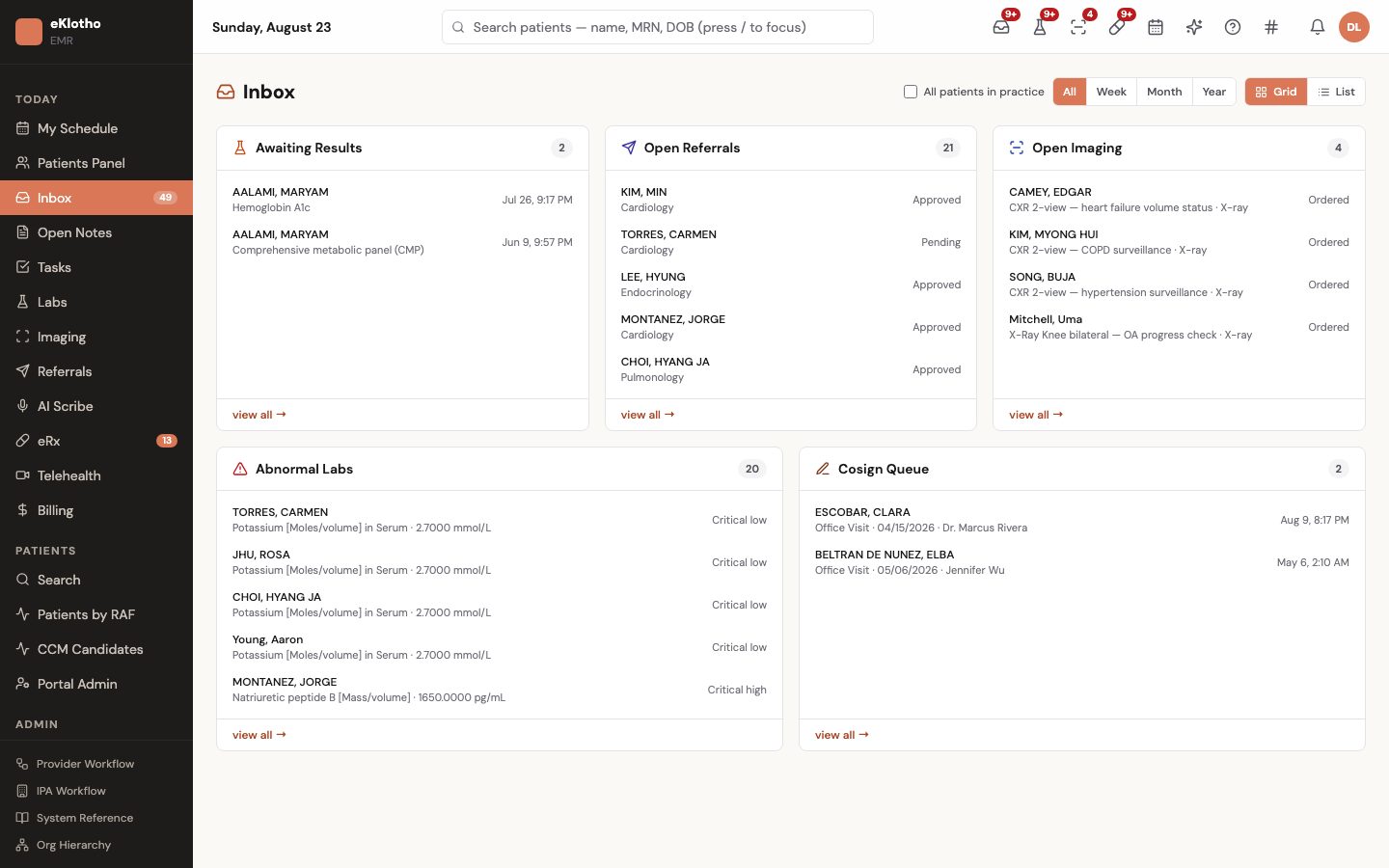
EMR Solution — main screen
EMR Solution — main screen (demo environment, synthetic data).
Who uses it

Built around the people doing the work

Physician

Needs · To finish the note before the next patient, with results and refills that need a decision in one list, and the prior auth handled without a fax.

Gets · An inbox of abnormal and pending labs, open imaging, open referrals and refill requests; an AI-drafted note to review and sign; care gaps and HCC suggestions on the same page; and a referral that opens the IPA's authorization workflow from the chart.

Nurse practitioner / physician assistant

Needs · To chart and prescribe independently while supervised notes reach the attending without sticky notes.

Gets · Full charting and vendor-connected e-prescribing, and a co-sign workflow where the signed note sits in the attending's queue until counter-signed.

Medical assistant / nurse

Needs · Vitals, screenings and immunizations captured quickly, and callbacks tracked so nothing waits on memory.

Gets · Encounter vitals and screening entry, immunization and procedure history, a tasks list with patient, priority and due date, and critical-result callback tracking with SLA.

Front desk

Needs · A day's schedule, check-in that opens the encounter, and a coverage answer before the patient sits down.

Gets · Provider availability and booking, check-in that creates the encounter, coverage status from the patient's enrolled insurance records, and portal invitations and appointment requests to triage.

Biller / coder

Needs · Charges captured on the encounter, not re-keyed from the note, and denials in one place.

Gets · Billing items built on signature with a suggested E&M level and bundling edits, the superbill and draft claim, a claim worklist by status with appeals, and per-patient statements and payment history.

Practice administrator / Medical Director

Needs · Users, rosters, payer enrollments, branding and legal text administered in one place, with a record of who touched which chart.

Gets · Account pages for practice info, billing entity, payer enrollments, provider roster with NPI verification and delegated scopes; MFA and passkeys; the practice's quality reports; and a per-patient access log with CSV export.

Today vs. with eKlotho

What actually changes

AreaTodayWith EMR Solution
Results follow-upResults arrive by fax or interface and sit in a folder until someone opens each chart.Results land in the inbox flagged abnormal or critical; critical values open a callback item, and signing clears the row.
Prior authorizationThe MA prints a cover sheet, faxes the plan, waits days, and re-keys the auth number when it comes back by phone.The referral reads the delegation contract, opens the auth in the IPA's own queue or auto-approves it, and the number appears on the referral row.
DocumentationThe clinician types the note after hours, or pays a separate scribe service that knows nothing about the payer.The ambient scribe drafts the note and proposes HCC codes and gap closures; the clinician edits, signs and remains the author of record.
PrescribingControlled substances are printed or handled in a separate vendor portal with its own login.Prescriptions go through the practice's configured vendor from inside the chart, with interaction and allergy checks against the chart and a controlled-substance log.
Coverage, quality and riskCoverage is confirmed by phone; HEDIS gaps come from a payer spreadsheet; RAF is a surprise after year end.Coverage reads from enrolled insurance records, care gaps sit in the chart on the IPA's record, and HCC is recomputed when the encounter is signed.
Changing clinics inside the networkA patient seen at a second site becomes a second record, with history re-entered or faxed over.The same patient row opens at the second site; the chart, authorizations and gaps travel with the patient.
Capabilities

What's included

11 modules, each describing what is built today.

Inbox, tasks & panel

The first screen of the day: everything that needs the clinician's decision, organized into queues, with the top header's patient search, AI assistant, user guide, internal chat, notifications and account tools on every page.

Charting & notes

Problem-oriented charting with structured, coded data and a note workflow that locks on signature, supports co-signature, and fans out downstream when the encounter closes.

e-Prescribing

Electronic prescribing through the practice's configured vendor (DoseSpot or Photon Health), with drug-safety checks run against the chart, refill and change-request queues, and controlled-substance support through the vendor.

Labs

Order, route and review results without leaving the chart. The order and the result are the same row: pending, then resulted, then signed.

Imaging

Imaging orders with modality, body region and clinical indication, routed to a facility from the practice's directory, with report ingestion, critical-finding acknowledgment and ABN generation for Medicare patients.

Referrals & prior authorization

Outgoing referrals tracked to closure — and, for clinics inside an IPA, the referral itself opens the prior-authorization workflow under the delegation contract.

AI ambient scribe

With patient consent, the visit is transcribed and a draft note is produced for the clinician to review, edit and sign. The scribe also proposes HCC codes and care-gap closures that the clinician accepts or rejects.

Telehealth workflow

Telehealth visits scheduled and run from the same chart window, with licensure checks, recording consent and place-of-service handling. The video layer connects to a vendor under the practice's agreement (vendor selection pending).

Encounter billing

Charge capture on the encounter builds the superbill and the claim, which is worked in the same claims engine the IPA uses — no parallel billing system.

Portal administration & chat

Clinician-side controls for the patient portal — accounts, invitations, proxy access, result release and secure threads — plus internal provider-to-provider chat scoped to the organization. The patient-facing site is a separate deployment.

Reports, settings & account

Quality and productivity reports computed by the Nexus engine and scoped to the clinician's panel, FHIR bulk export, and the per-user Settings and org-level Account pages a practice needs to run itself.

In depth

How it actually works

Who sees what, and why

One chart, many clinics: the access model

The first rule is hard isolation between organizations. Every session token names the user's organization and the exact set of entities it may reach, and every chart request is resolved against the patient's entity through those grants. A clinician at one IPA cannot open another IPA's chart — not hidden, but unreachable: the query returns nothing, because access is computed from the entity graph rather than checked against a list someone maintains.

Schedule to follow-up on one record

The visit lifecycle

Every encounter moves through five phases — schedule and intake, document, order, close and code, follow-up — and every phase reads and writes the same shared record. Booking creates the encounter; check-in confirms coverage from the patient's enrolled insurance; the medical assistant records vitals; and the provider opens a chart whose demographics, history and medication list are already loaded, because they were never anywhere else.

The sign-event fan-out

What happens when a note is signed

Signature is the pivot of the whole system, so it is engineered to never fail from the clinician's chair. The moment a note is signed it locks — from then on it changes only by visible addendum — and three downstream jobs dispatch: render and file the after-visit summary PDF, build the draft claim from the documented codes and diagnoses, and recompute the patient's HCC risk summary from the updated problem list.

Vendors behind one interface

e-Prescribing through a gateway

The EMR never talks to the national pharmacy network directly. Prescriptions route through the practice's configured vendor — DoseSpot or Photon Health — and every vendor sits behind one gateway interface inside the EMR, so the rest of the system never learns which vendor is on the wire. Which vendor a practice uses is per-practice configuration: two practices on the same platform can run different vendors at the same time, and the clinician's screen is identical either way.

Public code sets, cached locally

Terminology without a license bill

A chart is only as useful as its coding, and most EMRs make the practice pay for coding twice — in license fees, and in coupling to a vendor's proprietary catalog. This chart draws its core vocabularies from public national sources: RxNorm and LOINC from the National Library of Medicine, ICD-10, HCPCS and the HCC risk model from CMS, drug packaging from the FDA's NDC directory, and provider identity from the NPPES NPI registry.

Migration as a controlled load

Leaving a legacy EMR

Switching EMRs usually costs months because the new system has nowhere to put coded data. Here the terminology catalogs and a reconciliation key already exist in the schema, so migration is mapping into targets that exist rather than building them. Intake accepts, in order of richness, C-CDA and FHIR exports, HL7 v2 feeds, CSV or database dumps, and scanned PDF as a last resort.

How it works

From first step to outcome

  1. Start in the inbox

    Abnormal and pending labs, open imaging and referrals, refill requests, tasks and co-signs are queued per user; the clinician works the queue instead of hunting through charts.

  2. Intake and chart the visit

    Check-in opens the encounter with demographics, insurance and history already on the shared record; vitals and screenings are captured; the ambient scribe drafts the note while problems, medications and care gaps sit on the same page.

  3. Order, prescribe and refer

    Labs, imaging and prescriptions go out coded through the configured vendors and facilities; a referral reads the delegation contract and opens the authorization where the IPA owns it. Results route back to the inbox.

  4. Sign and close

    Signing locks the note, files the after-visit summary, builds the draft claim and recomputes the patient's HCC summary; the superbill is reviewed and the claim handed to the network's claims engine.

  5. Follow up and close the loop

    Results and consult notes come back to the same queues; the patient gets a result letter, follow-up tasks are created, and a service that closes a care gap credits the measure on the shared record.

  6. Stay in sync with the network

    Coverage status, care gaps, RPM and CCM data and quality measures are the same rows the IPA works from — nothing is exported, mapped or re-keyed.

A closer look

Screens and flows

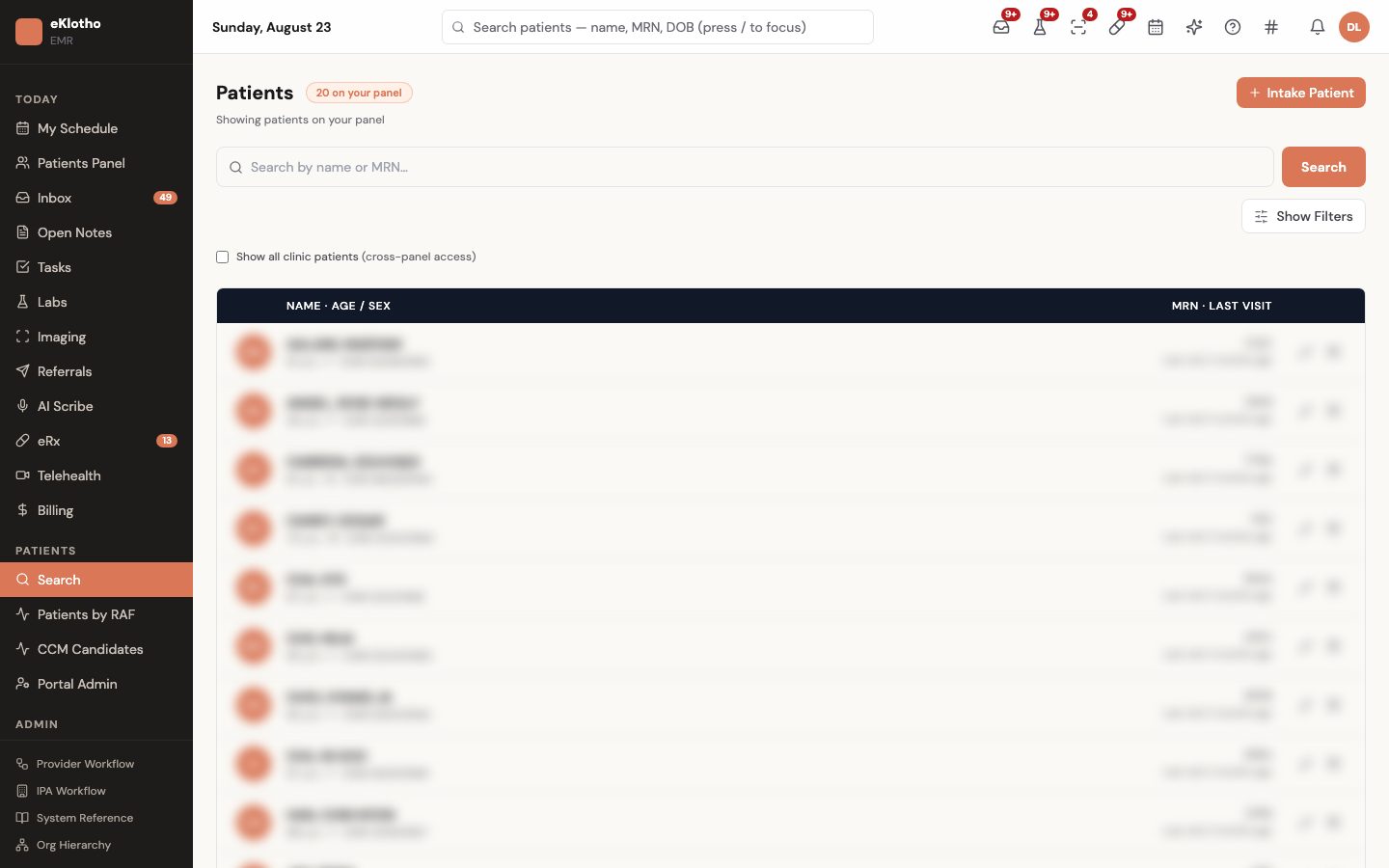
Patients panel
Patients panel — the clinician's panel with MRN, last visit and chart access (demo environment, synthetic data).
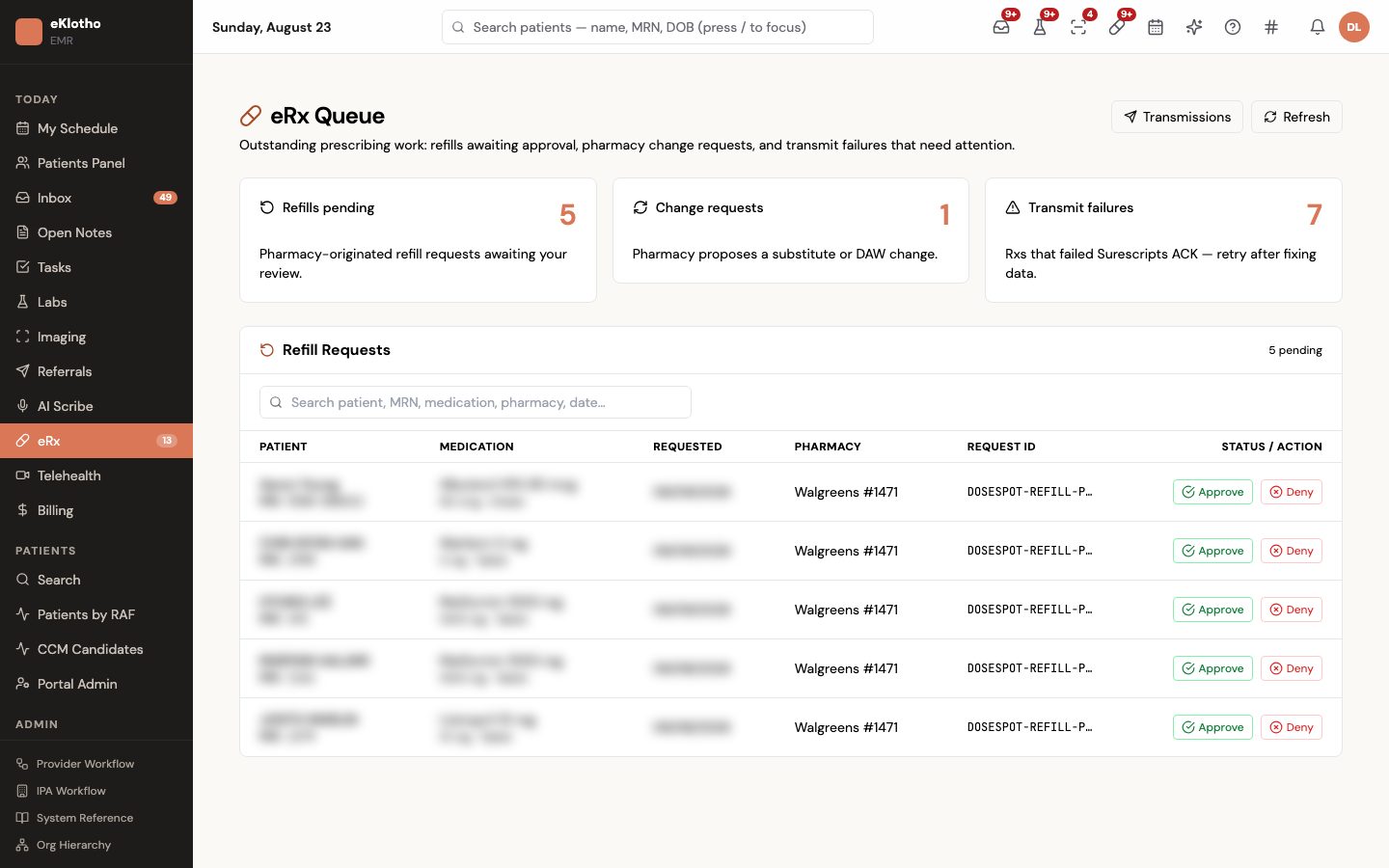
e-Prescribing
e-Prescribing — prescription queue, refills, change requests and transmission status (demo environment, synthetic data).
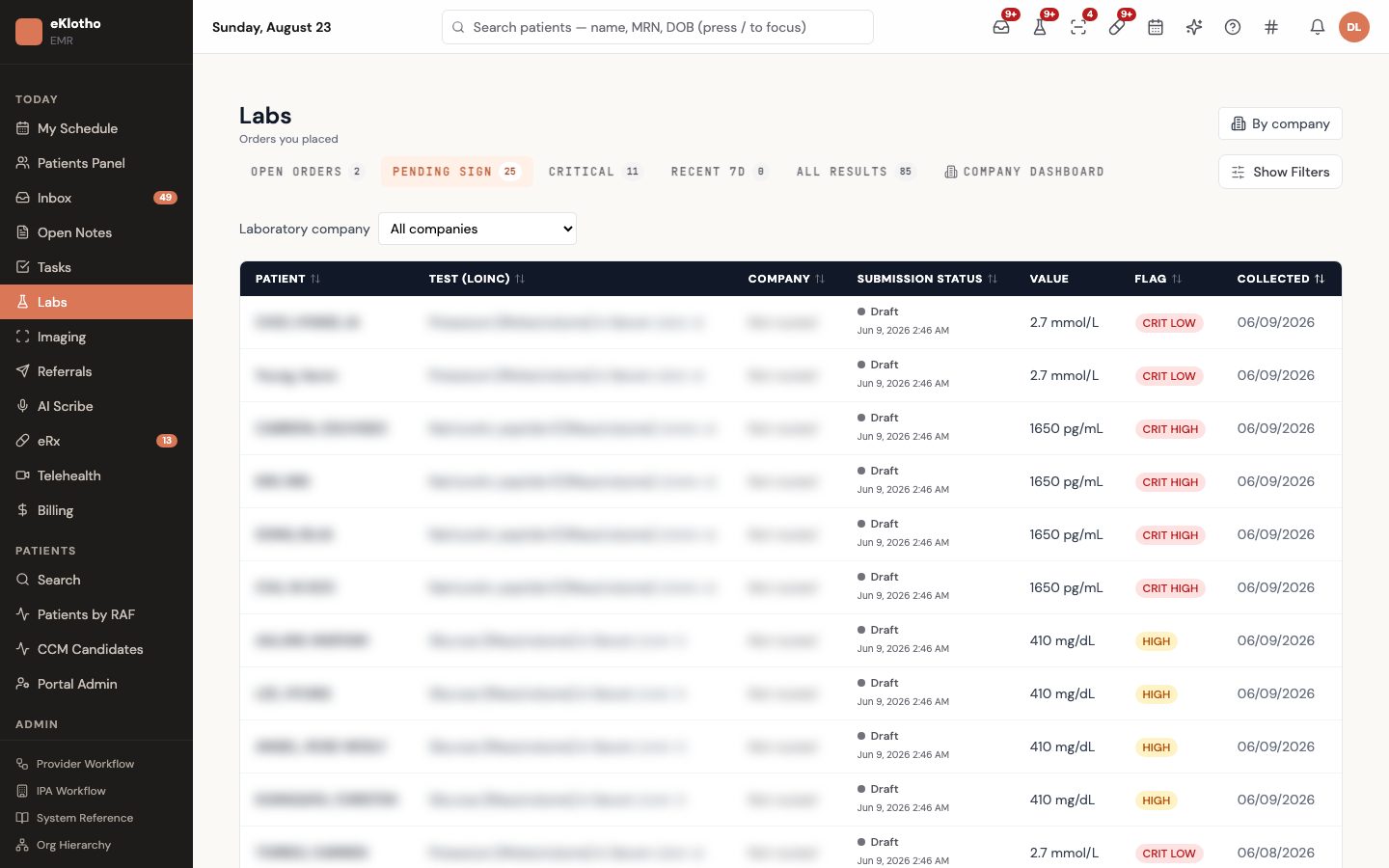
Labs
Labs — orders and results with abnormal flags, routed into the inbox (demo environment, synthetic data).
How we make sure

The mechanics behind the claims

Every promise on this page maps to something the software actually enforces.

The clinician is always the author of record
An AI scribe session can only be signed from the draft-ready state; signing stamps the clinician and time, every accept, edit and reject of a suggestion is audit-logged, and discarded drafts are never filed as notes.
Notes are never silently rewritten
A signed encounter note is changed only by adding an addendum, and supervised notes clear the co-sign queue only through an explicit co-sign action.
Signing an encounter does its downstream work durably
Signature dispatches three side effects — file the after-visit summary PDF, build the draft claim, recompute the HCC summary — through an outbox with one row per encounter and effect; a failed step is retried by cron, and signing always succeeds for the clinician.
The referral and the authorization are one workflow
On referral creation a UM hook evaluates the IPA's delegation and auto-approval rules and writes a UM review, an audit event and the hook result on the referral; it is fail-open, so the referral row is created even if the network side is down.
Abnormal results cannot be lost
Each incoming result is evaluated against abnormal-flag rules; critical values create a callback item with a 30-minute SLA, imaging critical findings carry called and acknowledged timestamps, and results leave the inbox only when signed or acknowledged.
Another clinic's patient is not another record
The EMR reads and writes the same patients table as Nexus; chart access is authorized by the patient's entity through the grants in the session token, so a network clinic opens the existing record instead of creating a duplicate, and every access is written to the per-patient log.
Outcomes

What changes for your team

  • Providers land on a single screen showing every actionable item, and the top header navigates the entire EMR
  • Critical values cannot be lost — callbacks and acknowledgments are recorded and auditable, and results leave the inbox only when signed
  • Referrals never sit in limbo waiting for an authorization: the IPA's UM queue opens from the chart and the auth number returns to the referral row
  • Encounter signed, note locked, after-visit summary filed and draft claim built in one action; denials are managed in one inbox
  • A draft note from the visit, HCC suggestions and care-gap closures reviewed and signed by the clinician — no separate scribe subscription
  • Quality scores, RAF and care gaps visible inside the EMR from the same engine the IPA reports with
  • A practice can self-serve onboarding — roster, payer enrollments, branding, users — without engineering help
FAQ

Common questions

Terms on this page

Network-native
The EMR shares the network platform's patient record and entity graph rather than syncing with it — one row per patient across clinic, IPA and plan.
Delegation
A health plan's written transfer of a function such as prior authorization to the IPA; the EMR reads it to decide who owns a referral's authorization.
EPCS
Electronic prescribing of controlled substances — identity proofing and an audit trail, handled through the configured e-prescribing vendor.
Co-sign
A supervising clinician's signature on a note written by a supervised clinician; pending notes sit in the co-sign queue.
Addendum
An addition to a signed note, recorded as a separate entry so the original is unchanged.
HCC / RAF
Hierarchical Condition Categories and the Risk Adjustment Factor — the CMS model that scores documented chronic conditions; the scribe suggests HCCs and signing recomputes the score.
LOINC / RxNorm / ICD-10
The standard code sets for lab observations, medications and diagnoses, served from public NLM and CMS sources and cached locally.
Care gap
A recommended service a patient has not yet received in the measurement period, surfaced in the chart from the shared quality record.
Surescripts
The national e-prescribing network. The practice's configured vendor holds the network certification and transmits on it; the EMR keeps the clinical record.
C-CDA
The standard continuity-of-care export every mainstream EMR can produce — coded problems, medications, allergies, results and encounters — and the preferred intake when migrating charts.
Do we have to be part of an IPA to use it?

No. Standalone and non-network clinics get the full EMR. Network affiliation adds the delegation-aware referral workflow, care gaps from the shared record and cross-clinic continuity; it is never assumed.

What happens when a doctor places a referral?

The referral is created immediately. If the clinic is inside an IPA, a hook reads the IPA's delegation with the patient's plan: the auth is auto-approved under the contract's rules, opened for review in the IPA's UM queue, recorded as plan-owned, or marked not required. The result and any authorization number appear on the referral row.

Is the AI scribe a separate subscription?

No. Ambient drafting, HCC suggestions and care-gap detection are built in. Every draft and suggestion is reviewed and signed by the clinician; nothing is filed automatically, and every decision is audit-logged.

How does e-prescribing and EPCS work?

Through the practice's configured vendor — DoseSpot or Photon Health — behind one gateway interface. Drug-interaction and allergy checks run against the chart. Controlled-substance prescribing uses the vendor's identity proofing, and the EMR keeps a controlled-substance audit log.

Is there video telehealth?

The telehealth workflow — lobby, licensure check, recording consent, place-of-service handling and the encounter — exists today. Live video connects through a vendor under the practice's agreement, and that vendor selection is pending.

Is there a patient-facing portal?

The EMR manages portal accounts, invitations, proxy access, result release and secure threads from the clinician side. The patient-facing website is a separate deployment configured per practice.

How do we move charts from our current EMR?

Through an extract, stage, reconcile and load process that accepts C-CDA, FHIR, HL7 v2, CSV or PDF, normalizes codes against the catalogs already in the database, keeps the legacy key on every loaded row for rollback, and quarantines anything that cannot be matched rather than dropping it.

Who can see a patient's chart inside our organization?

That is a posture the practice chooses. Access never crosses organizations — that isolation is absolute. Within one, a small clinic can run an open chart for full coverage; a larger group scopes patient lists to each provider's care-team panel, note writing is gated to the attending and care team, supervised notes wait for co-sign, and every chart open lands in the per-patient access log.

Which code systems does the chart run on — and do we pay for them?

Diagnoses in ICD-10, medications in RxNorm, labs in LOINC, procedures in HCPCS and risk in the CMS-HCC model — all drawn from public NLM, CMS and FDA sources and cached locally, so there is no per-seat terminology fee. The one exception is the commercially licensed procedure vocabulary, which comes through the practice's own licensed catalog.

See EMR Solution on your own workflows

We walk through it with your data and your team — not a canned demo.

Program and billing eligibility are determined by each practice and its payers. Results and alerts do not constitute a medical diagnosis. Third-party names are trademarks of their respective owners and do not imply endorsement.